

A WordPress notification bar – also called a top bar, announcement bar, or hello bar – is one of the highest-converting elements you can add to your site. It sits at the very top of every page, visible before visitors even begin scrolling, making it the perfect place for promotions, announcements, countdown timers, and calls to action.
In this guide we tested and compared the 7 best WordPress notification bar plugins available in 2026 – covering free options, WooCommerce – specific tools, and premium solutions for businesses that need advanced targeting and countdown timers.
| Quick answer: If you run a WooCommerce store, wiseCampaign is the best notification bar plugin because it combines a top bar banner with a full WooCommerce marketing toolkit – countdown timers, stock bars, discount rules and more – all in one free plugin. |
What to look for in a WordPress notification bar plugin
Before diving into the list, here are the features that actually matter when choosing a notification bar plugin for WordPress:
- Countdown timer support — for flash sales and limited-time offers
- Display rules — show different bars on different pages or to different users
- WooCommerce compatibility — especially for stores that want to show cart-related messages
- Mobile responsiveness — your bar must look good on phones
- Page speed impact — a heavy plugin will slow your site down
- Free version quality — many plugins cripple the free version to force upgrades
Quick comparison – all 7 plugins at a glance
| Plugin | Free version | Starts at | WooCommerce | Countdown | Best for |
| wiseCampaign | Yes | $59/yr | Native | Yes | WooCommerce stores |
| WP Notification Bar | Yes | $29/yr | Basic | No | Simple bars |
| Hello Bar | Limited | $49/mo | No | Yes | Lead capture |
| OptinMonster | No | $9/mo | Yes | Yes | Marketing teams |
| Hustle | Yes | $7.50/mo | No | No | Social proof |
| Icegram | Yes | $97/yr | No | Yes | Budget option |
The 7 best WordPress notification bar plugins for 2026
#1 wiseCampaign – Best for WooCommerce stores
|
Free: Yes — WordPress.org | Pro: From $59/year | Best for: WooCommerce store owners What we like: Only plugin that combines a notification bar with a full WooCommerce toolkit + Native countdown timer built into the banner – no extra plugin needed + Stock urgency bar, direct checkout, sales notifications and discount manager included + Free version on WordPress.org includes core banner features + Lightweight – only loads scripts for features you enable + Used by 1,000+ stores in 180+ countries Worth knowing: The discount manager and advanced targeting require the Pro plan from $59/year Verdict: wiseCampaign is the obvious choice for any WooCommerce store. While other plugins offer a notification bar as a standalone feature, wiseCampaign turns it into a complete conversion toolkit. The free version alone outperforms most paid alternatives for WooCommerce users. |
#2 WP Notification Bar – Best free option for simple sites
|
Free: Yes — WordPress.org | Pro: From $29/year | Best for: Bloggers and small sites What we like: Extremely lightweight — minimal impact on page speed + Simple setup – live in under 5 minutes + Color customization and basic targeting in the free version + Long track record — stable and well-maintained Worth knowing: No countdown timer in the free version. WooCommerce features are very limited. Verdict: WP Notification Bar is the best choice if you just need a simple, clean announcement bar without any complexity. It does one thing well. If you need more than a basic bar, look at wiseCampaign instead. |
#3 Hello Bar – Best for lead capture
|
Free: Limited — 5,000 visitors/month cap | Pro: From $49/month | Best for: Marketing teams focused on email capture What we like: Beautiful pre-built templates + Built-in A/B testing on all plans + Strong email list integration — connects to most major email tools + Countdown timer available on paid plans Worth knowing: Free version is very limited. Pricing is significantly higher than WordPress-native alternatives at $49/month. Not built specifically for WordPress. Verdict: Hello Bar is a polished tool but expensive for what it offers compared to WordPress-native alternatives. Better suited for teams already using Hello Bar’s broader marketing suite. |
#4 OptinMonster – Best for advanced marketing automation
| Free: No free version | Pro: From $9/month | Best for: Established businesses with marketing budget What we like: Most powerful targeting rules of any plugin on this list + Exit-intent detection — shows bar as visitor is about to leave + Hundreds of templates and extensive A/B testing + Integrates with all major CRMs and email tools Worth knowing: No free version. Monthly subscription can get expensive. Overkill for most small WordPress sites. Verdict: OptinMonster is the enterprise choice – powerful but expensive. If you need basic notification bars for WooCommerce, wiseCampaign gives you more relevant features at a fraction of the price. |
#5 Hustle – Best free option for social proof
|
Free: Yes — WordPress.org | Pro: From $7.50/month via WPMU Dev | Best for: Sites already using WPMU Dev plugins What we like: Generous free version with no visitor cap + Social sharing bar option is unique + Clean, modern interface + Good integration with WPMU Dev ecosystem Worth knowing: No WooCommerce-specific features. No countdown timer. Best value only if you already use WPMU Dev. Verdict: Hustle is a solid free option if you are already in the WPMU Dev ecosystem. For standalone use, wiseCampaign or WP Notification Bar offer better value for WordPress and WooCommerce sites. |
#6 Icegram – Best budget paid option
| Free: Yes — WordPress.org | Pro: From $97/year | Best for: Budget-conscious site owners who need paid features What we like: Good variety of bar styles and positions + Countdown timer available + Reasonable one-time pricing on some plans + Decent targeting options on paid plans Worth knowing: Interface feels dated. Free version is quite limited. Less active development than some competitors. Verdict: Icegram is a workable budget option but feels dated compared to more modern alternatives. wiseCampaign’s free version actually includes more useful features for WooCommerce stores. |
#7 Ninja Notifications – Best for simple floating bars
| Free: Yes — WordPress.org | Pro: From $39/year | Best for: Sites that want a floating notification widget What we like: Unique floating bar position options + Very lightweight + Good free version for basic use + Easy drag-and-drop positioning Worth knowing: Limited WooCommerce integration. No countdown timer. Niche use case. Verdict: Ninja Notifications is worth considering if you specifically want a floating notification widget rather than a full-width top bar. For most WordPress and WooCommerce sites the other options on this list are more feature-complete. |
How to add a notification bar to WordPress – step by step
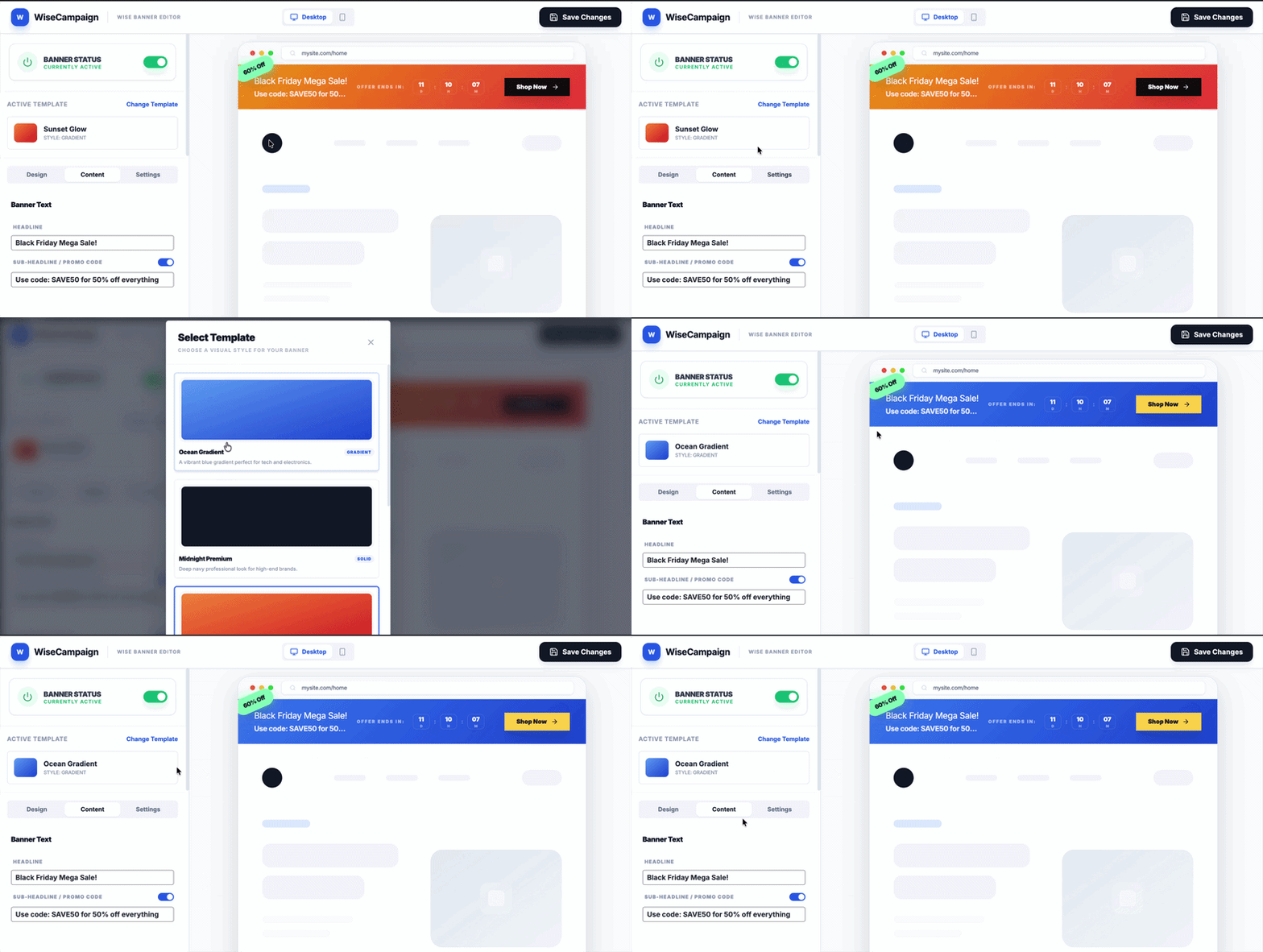
Here is how to add a notification bar to your WordPress site using wiseCampaign (the same general steps apply to most plugins on this list):
- Go to WordPress Dashboard → Plugins → Add New
- Search for wiseCampaign
- Click Install Now then Activate
- Go to wiseCampaign → wiseBanner in the left sidebar
- Click New Banner and choose a template
- Customize your text, colors, and button
- Enable the countdown timer if you want urgency — set your end date and time
- Under Display Rules — choose which pages to show the bar on
- Toggle the banner to Active and click Save
- Visit your site — your notification bar is now live
| Pro tip: The most effective notification bars are specific, not generic. Instead of ‘Welcome to our store’ try ’48-hour sale — 15% off all products. Ends Sunday midnight.’ Specific + time-bound = more clicks. |
WordPress notification bar vs popup – which is better?
This is a common question. Notification bars and popups serve different purposes and are not interchangeable:
| Notification bar | Popup |
| Always visible — does not interrupt browsing | Interrupts the visitor — higher attention but higher annoyance |
| Works passively — visitors notice it when ready | Requires dismissal — can frustrate visitors |
| Best for ongoing promotions and announcements | Best for one-time lead capture and urgent offers |
| Minimal impact on user experience | Can increase bounce rate if triggered too early |
| Better for WooCommerce — visible throughout shopping | Better for email capture before visitor leaves |
For WooCommerce stores, a notification bar is almost always more effective than a popup for product promotions. It stays visible as the customer browses your catalog, adds items to cart, and moves toward checkout – creating consistent urgency throughout the journey.
Frequently asked questions
| What is the best free WordPress notification bar plugin? wiseCampaign is the best free notification bar plugin for WordPress, especially for WooCommerce stores. The free version includes the wiseBanner top bar with full customization, display rules, and basic countdown functionality. WP Notification Bar is a solid alternative for non-WooCommerce sites. |
| Will a notification bar slow down my WordPress site? A well-coded notification bar plugin adds minimal overhead – typically under 10kb of JavaScript. wiseCampaign is specifically optimized to only load scripts for features you have enabled. Avoid heavy page-builder-based notification solutions which can add 100kb+ to your page weight. |
| Can I add a countdown timer to my WordPress notification bar? Yes. wiseCampaign, Hello Bar, OptinMonster, and Icegram all support countdown timers in the notification bar. wiseCampaign is the only free option that includes a countdown timer as a core feature without requiring a paid upgrade. |
| What is the difference between a notification bar and a top bar plugin? They are the same thing. A notification bar, top bar, announcement bar, hello bar, and header bar all refer to the same UI element – a full-width banner that appears at the top of your website. Different plugins use different terminology but the function is identical. |
| Can I show different notification bars on different pages? Yes – most plugins on this list support page-level targeting. wiseCampaign allows you to show specific banners on specific pages, product categories, or to specific user types (logged in, guests, WooCommerce customers). This lets you show a relevant message on every page. |
| Is a WordPress notification bar good for SEO? A notification bar itself has no direct impact on SEO rankings. However, if it includes a structured promotion that increases conversions and time-on-site, it can indirectly help. Make sure your notification bar is not causing layout shift issues which can affect Core Web Vitals scores. wiseCampaign is built to avoid Cumulative Layout Shift. |
Our recommendation – which plugin should you choose?
After testing all seven plugins, here is our clear recommendation based on your situation:
| Running a WooCommerce store? Choose wiseCampaign. It is the only plugin on this list built specifically for WooCommerce with native countdown timers, stock bars, direct checkout, and discount rules all included. The free version is more powerful than the paid version of most alternatives. |
| Running a non-WooCommerce WordPress site and just need a simple bar? Choose WP Notification Bar. It is lightweight, reliable, and free for basic use. |
| Running an agency or managing multiple sites and need advanced marketing automation? Consider OptinMonster or Hello Bar – but expect to pay significantly more per month. |
All plugins listed in this guide have been tested on WordPress 6.9 with WooCommerce 9.x. Plugin data including pricing was accurate as of March 2026.
| About the author This guide was written by the Wisemattic team. We build WooCommerce marketing plugins used by 1,000+ store owners in 180+ countries. wiseCampaign is our flagship plugin – a free WooCommerce marketing toolkit that includes notification bars, countdown timers, stock bars, direct checkout, sales notifications, and an advanced discount manager. wisemattic.com/wisecampaign/ |
Leave a Reply