

A WordPress notification bar plugin adds a slim, full-width message to the top (or bottom) of your site. You may also know it as an announcement bar, alert bar, promo bar, top bar banner or hello bar. Visitors see it before they scroll, so it is the natural place for sales, free shipping offers, countdown timers, coupon codes and important notices.
In this guide we compare the 7 best WordPress notification bar plugins for 2026, from free announcement bar plugins to paid marketing tools. We checked every plugin on WordPress.org in November 2026 (active installs, rating, last update, and what is free vs Pro). Plugins that are no longer maintained did not make the list.
| Quick answer: For a WooCommerce store, wiseCampaign is our pick. Its free wiseBanner module gives you a top bar with a countdown timer, a click-to-copy coupon and a CTA button, plus a matching exit-intent popup. For a simple free announcement bar on any site, choose WPFront Notification Bar or Simple Banner. Need several bars on a free plan? Try Notibar. |
Quick comparison: 7 WordPress notification bar plugins at a glance
| Plugin | Free version | Paid from | Countdown timer | Best for | Last updated |
|---|---|---|---|---|---|
| wiseCampaign | Yes | $59/yr | Free | WooCommerce promo bars | Nov 2026 |
| WPFront Notification Bar | Yes | Pro available | No | Simple scheduled alert bar | Sep 2026 |
| Simple Banner | Yes | Pro available | No | One lightweight announcement bar | Oct 2026 |
| Notibar | Yes | Pro available | Pro | Multiple bars for free | Nov 2026 |
| Hello Bar | Up to 5,000 views/mo | $29/mo* | — | Lead capture | Jun 2026 |
| OptinMonster | 3 campaigns, 500 impressions | $9/mo* | Pro plan | Advanced targeting | Aug 2026 |
| ConvertForce | Yes | Pro available | Pro | Block editor users | Oct 2026 |
* Billed annually. “—” means we could not confirm it on the vendor’s public pages. “Last updated” is the date on the plugin’s WordPress.org page. All data checked on 7 November 2026.
What to look for in a WordPress notification bar plugin
Before diving into the list, here are the features that actually matter when choosing a notification bar plugin for WordPress:
- Countdown timer support — for flash sales and limited-time offers
- Display rules — show the bar on selected pages, or only to some visitors
- Placement — top or bottom, static or sticky, with or without a close button
- WooCommerce features — coupon codes, sale countdowns and order tracking for stores
- Mobile responsiveness — your bar must look good on phones
- Page speed impact — a heavy plugin will slow your site down
- Active maintenance — check the “Last updated” date on WordPress.org; an abandoned plugin can break after a WordPress update
- Free version quality — many plugins cripple the free version to force upgrades
The 7 best WordPress notification bar plugins for 2026
1. wiseCampaign (wiseBanner) – Best for WooCommerce promo bars with a countdown
|
Free: Yes — WordPress.org | Pro: From $59/year | Best for: WooCommerce stores running sales and coupon campaigns WordPress.org: 40+ active installs, rated 5.0 (6 reviews), updated November 2026 What we like: Countdown timer (with automatic restart), click-to-copy coupon code and CTA button are all free + 5 free templates and 21 Pro seasonal templates (Black Friday, Christmas, Eid and more) + Matching exit-intent popup included + Built-in banner analytics: impressions, clicks, click-through rate and coupon copies for free; orders and revenue with Pro + Works on any WordPress site; WooCommerce is only needed for revenue tracking + Modules you switch off are not loaded at all Worth knowing: Shows one banner at a time. The bottom position, sticky bar, close button and page targeting need Pro. It is a newer plugin with a small user base so far. Verdict: If you sell with WooCommerce, wiseCampaign turns the notification bar into a sales tool: a countdown, a coupon and a button in one bar, with an exit-intent popup, side cart and stock bar in the same plugin. If you only need a plain text announcement bar on a blog, a lighter plugin below may be enough. |
2. WPFront Notification Bar – Best free alert bar for any site
|
Free: Yes — WordPress.org | Pro: Yes (multiple bars, advanced editor) | Best for: Blogs, business sites and stores that need one simple bar WordPress.org: 40,000+ active installs, rated 4.5 (131 reviews), updated September 2026 What we like: Message with an optional button + Top or bottom position, with a sticky option + Close button and reopen button + Show the bar on selected pages and posts, or for selected user roles + Start and end dates + Option to hide the bar on small devices Worth knowing: No countdown timer or coupon field in the free feature list. Multiple bars need Pro. Verdict: WPFront is a dependable free choice for a classic WordPress alert bar: one message, one button, scheduled and targeted. It is also the maintained alternative to the old WP Notification Bars plugin (see “Also considered” below). |
3. Simple Banner – Best lightweight announcement bar
|
Free: Yes — WordPress.org | Pro: Yes (up to 5 banners) | Best for: Sites that want one clean text banner WordPress.org: 50,000+ active installs, rated 4.8 (45 reviews), updated October 2026 What we like: Simple settings page with a live preview + Custom colors for the text, links and background + Rich text editor and your own custom CSS + Optional close button + WPML support Worth knowing: No countdown timer, button builder or templates. More than one banner needs Pro. With some themes you have to change the “Prepend element” setting so the banner sits above the header. Verdict: Simple Banner does one job well: a text announcement bar at the top of your site. It is the most-installed dedicated banner plugin on this list. |
4. Notibar – Best for multiple free notification bars
|
Free: Yes — WordPress.org | Pro: Yes | Best for: Sites that run several announcements at once WordPress.org: 8,000+ active installs, rated 4.8 (71 reviews), updated November 2026, by NinjaTeam What we like: Create and schedule multiple bars on the free plan + Edit in the WordPress Customizer with a live preview + Separate text and button for mobile visitors + Dismiss button that closes for good, collapses, or is turned off + Page and post rules for each bar + Export and import Worth knowing: Countdown timers, the bottom position, WooCommerce product targeting, user role targeting and per-bar click reports are Pro features. Verdict: Notibar is the most generous free option if you need more than one bar, for example a shipping notice on product pages and a newsletter bar on the blog. |
5. Hello Bar – Best for lead capture
|
Free: Starter plan, up to 5,000 views/month | Paid: From $29/month (billed annually) | Best for: Marketers who want bars and popups for email capture WordPress.org: 3,000+ active installs, rated 1.6 (7 reviews), updated June 2026 What we like: Header and footer bars, modals, alerts, sliders and page takeovers from one account + A/B testing on every paid plan + Email marketing integrations + Targeting by location, ad campaign and date (advanced targeting on paid plans) Worth knowing: The WordPress plugin only connects your site to a HelloBar.com account; you build your bars on their website. Campaigns pause when you reach your monthly view limit. The WordPress.org plugin has low ratings. Verdict: Hello Bar is a good fit when lead capture is the goal and you are happy to work in a SaaS dashboard. For a WordPress-native bar, the plugins above are simpler and have no view limits. |
6. OptinMonster – Best for advanced targeting and marketing teams
|
Free: Free account with 3 campaigns and 500 impression credits | Paid: Basic from $9/month (billed annually) | Best for: Established businesses with a marketing budget WordPress.org: 1+ million active installs, rated 4.3, updated August 2026 What we like: Floating bars, popups, slide-ins and spin-to-win wheels in one tool + Exit-intent and campaign scheduling + Static and evergreen countdown timers + Integrates with major email services, CRMs and WooCommerce Worth knowing: Countdown timers and exit-intent start on the Pro plan ($37/month, billed annually). The Basic plan is $108 for the first year and renews at $210/year. You build campaigns in OptinMonster’s app, so you need an account. Verdict: OptinMonster is the most powerful option on this list, and it is priced like it. If all you need is a WooCommerce sale bar with a countdown, wiseCampaign covers that in its free version. |
7. ConvertForce – Best for block editor (Gutenberg) users
|
Free: Yes — WordPress.org | Pro: Yes | Best for: Site owners who build everything with blocks WordPress.org: 100+ active installs, rated 4.7 (3 reviews), updated October 2026 What we like: Design bars with the WordPress block editor you already know + Three display types: notification bar, lightbox popup and slide-in + Bars at the top or bottom, sticky or static, that push content down instead of covering it + 15 ready-made patterns, including a cookie bar, a free shipping bar and sale bars + Display conditions in the free version Worth knowing: The countdown timer, exit intent and 37 advanced targeting conditions are Pro. It is a young plugin with a small user base. Verdict: ConvertForce is a good fit if you already work in Gutenberg. For a WooCommerce countdown bar, wiseCampaign gives you the timer for free. |
Also considered
- Easy Notification Bar (WPExplorer) — completely free, with no upsells: a sitewide or homepage-only top bar with a button, a sticky option and a close icon. 9,000+ active installs, updated March 2026.
- Icegram Engage — free header and footer “action bars” plus popups and slide-ins. Countdown timers and exit intent are in the paid Max plan. 10,000+ active installs.
- Hustle (WPMU DEV) — popups, slide-ins, embeds and social share bars, with 3 of each on the free plan. It has no dedicated top notification bar, so it is not in our top 7.
- WP Notification Bars (MyThemeShop) — still shows 10,000+ active installs, but it was last updated in February 2022 and WordPress.org warns that it has not been tested with the last 3 major WordPress releases. Use WPFront Notification Bar instead.
How to add a notification bar to WordPress (quick version)
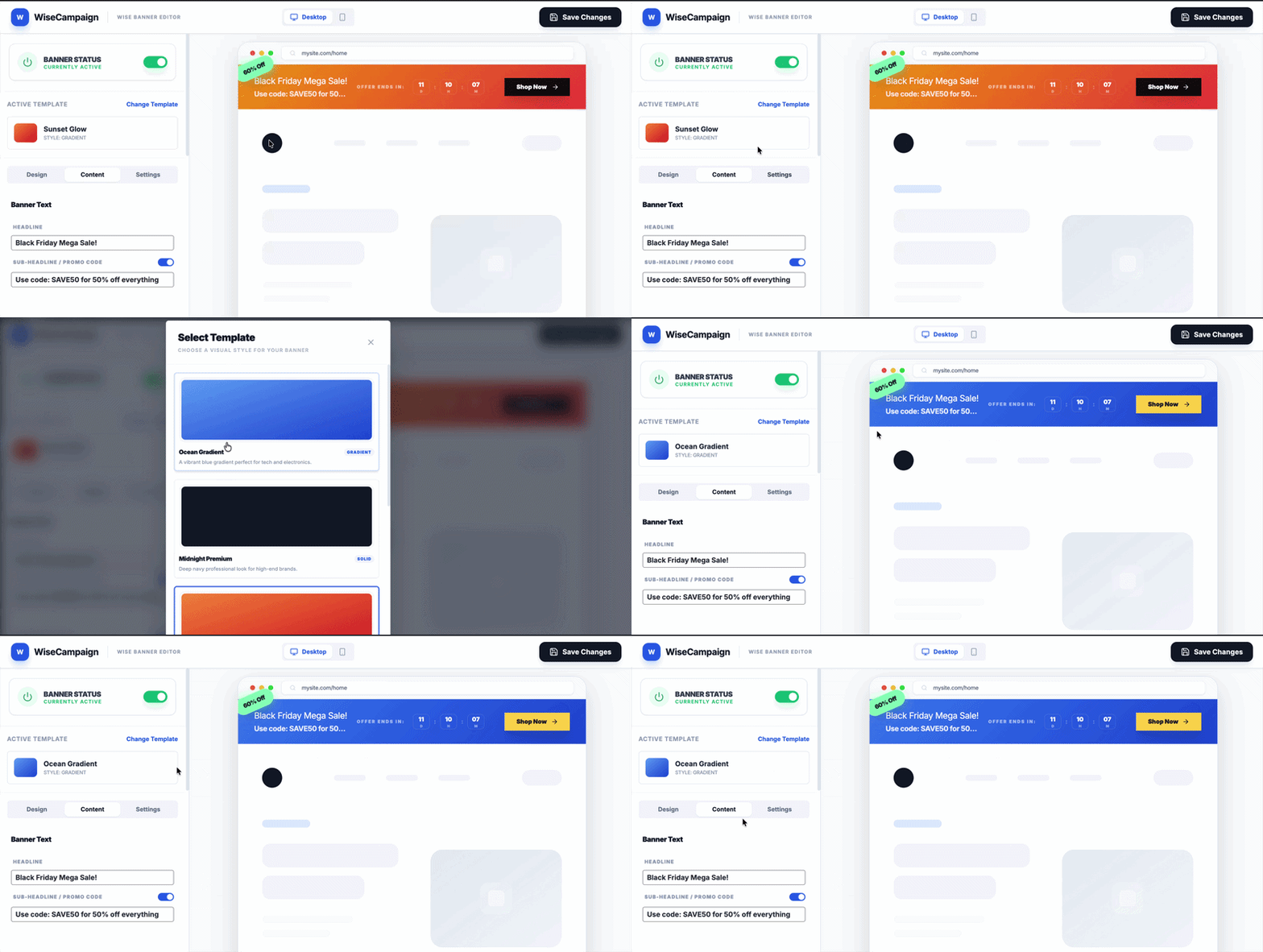
The steps are similar in every plugin on this list. With wiseCampaign it looks like this:
- Go to Plugins → Add Plugin, search for wiseCampaign, then click Install Now and Activate.
- Open WiseCampaign → wiseBanner, click Change Template and pick a design.
- In the Content tab, add your headline, coupon code, countdown end date and button link.
- In the Settings tab, keep All Pages on (or pick specific pages with Pro).
- Click Save Changes and check that Banner Status says Currently Active.
For screenshots of every screen, a no-plugin code method and design tips, follow our step-by-step guide on how to add a top bar in WordPress.
You can also follow this step by step video tutorial below
| Pro tip: The most effective notification bars are specific, not generic. Instead of ‘Welcome to our store’ try ’48-hour sale — 15% off all products. Ends Sunday midnight.’ Specific + time-bound = more clicks. |
Notification bar vs popup: which is better?
This is a common question. Notification bars and popups serve different purposes and are not interchangeable:
| Notification bar | Popup |
| Always visible — does not interrupt browsing | Interrupts the visitor — higher attention but higher annoyance |
| Works passively — visitors notice it when ready | Requires dismissal — can frustrate visitors |
| Best for ongoing promotions and announcements | Best for one-time lead capture and urgent offers |
| Minimal impact on user experience | Can increase bounce rate if triggered too early |
| Better for WooCommerce — visible throughout shopping | Better for email capture before visitor leaves |
For WooCommerce stores, a notification bar is almost always more effective than a popup for product promotions. It stays visible as the customer browses your catalog, adds items to cart, and moves toward checkout – creating consistent urgency throughout the journey. You can also combine both: wiseCampaign pairs its bar with an exit-intent popup that shows at most once per visit and never on the checkout page.
Which WordPress notification bar plugin should you choose?
Here is our recommendation based on your situation:
| Running a WooCommerce store? Choose wiseCampaign. Its free version gives you a promo bar with a countdown timer, a click-to-copy coupon and a CTA button, plus an exit-intent popup, side cart, stock bar, Buy Now button and sales notifications in the same plugin. |
| Need a simple free announcement bar or alert bar on any WordPress site? Choose WPFront Notification Bar or Simple Banner. Need several bars on a free plan? Choose Notibar. |
| Running an agency or a marketing team that needs lead capture, A/B testing and advanced targeting? Consider OptinMonster or Hello Bar, but expect a monthly bill. Prefer building in the block editor? Try ConvertForce. |
Plugin data in this guide (active installs, ratings, last update dates, free vs Pro features and prices) was checked on WordPress.org and on each vendor’s website on 7 November 2026.
FAQ: WordPress notification bar plugins
What is the best free WordPress notification bar plugin?
It depends on what the bar needs to do. For a WooCommerce sale bar, wiseCampaign is the best free choice because the countdown timer, click-to-copy coupon and CTA button are all in the free version. For a simple text announcement bar on any site, WPFront Notification Bar (40,000+ active installs) and Simple Banner (50,000+ active installs) are free and actively maintained. If you need several bars without paying, Notibar lets you create multiple bars on its free plan.
What is the difference between a notification bar, an announcement bar and an alert bar?
In practice there is none. Notification bar, announcement bar, alert bar, promo bar, top bar, header bar and hello bar all describe the same thing: a full-width strip at the top (or bottom) of a page with a short message and often a button. Plugin makers simply use different names.
Can I add a countdown timer to a WordPress notification bar for free?
Yes. The wiseBanner countdown timer in wiseCampaign is free, including automatic restart for daily deals. In Notibar, ConvertForce, OptinMonster and Icegram Engage, countdown timers are paid features. WPFront Notification Bar, Simple Banner and Easy Notification Bar do not list a countdown timer.
Can I show different notification bars on different pages?
Yes, but it depends on the plugin. WPFront Notification Bar lets you pick pages, posts and user roles in the free version, and Notibar gives every bar its own page rules on the free plan. wiseCampaign shows one banner at a time: on all pages in the free version, or only on the home page and the pages you choose (such as Shop or Cart) with Pro.
Will a notification bar slow down WordPress or hurt SEO?
A lightweight bar plugin has very little impact on page speed, and a bar does not affect rankings directly. Watch two things: avoid heavy page builders or third-party scripts if all you need is a text bar, and make sure the bar does not push content down after the page loads, which counts as layout shift (CLS) in Core Web Vitals. Test your pages with PageSpeed Insights after you switch the bar on. In wiseCampaign, modules you turn off on the Getting Started page are not loaded at all.
| About the author This guide was written by the Wisemattic team. We build WooCommerce marketing plugins. wiseCampaign is our flagship plugin – a free WooCommerce marketing toolkit that includes notification bars, countdown timers, an exit-intent popup, a side cart, stock bars, direct checkout, sales notifications and (in Pro) BOGO and bulk discounts. wisemattic.com/wisecampaign/ |

Leave a Reply