

Most WooCommerce stores spend their marketing budget on finding new customers. But the shopper who already bought from you knows your products, trusts your checkout and has their details saved. Getting them to order again usually costs far less than winning someone new, and every repeat order makes your ad spend for the first one more worthwhile.
This guide shows how to measure repeat purchases in WooCommerce and 10 practical ways to increase them, from a better first order to next order coupons, reorder reminders and VIP offers. Where a tactic needs a tool, we show how to do it with wiseCampaign or with WooCommerce itself.
How to measure repeat purchases in WooCommerce
Your repeat customer rate is the share of customers who have ordered more than once.
Copied!Repeat customer rate = Customers with 2+ orders ÷ All customers × 100
In WooCommerce, open Analytics → Customers. The report lists each customer with their number of orders, total spend and average order value. Sort by Orders to see your most loyal customers, and use the filters to compare customers with one order against those with several. Note the rate today, so you can see whether the tactics below move it.
1. Make the first order worth repeating
No coupon brings back a customer whose first order arrived late or broken. Ship quickly, send clear order and tracking emails, pack carefully and make returns easy. A short handwritten thank-you note or a small sample in the box costs little and is remembered.
2. Give a coupon for the next order, right after checkout
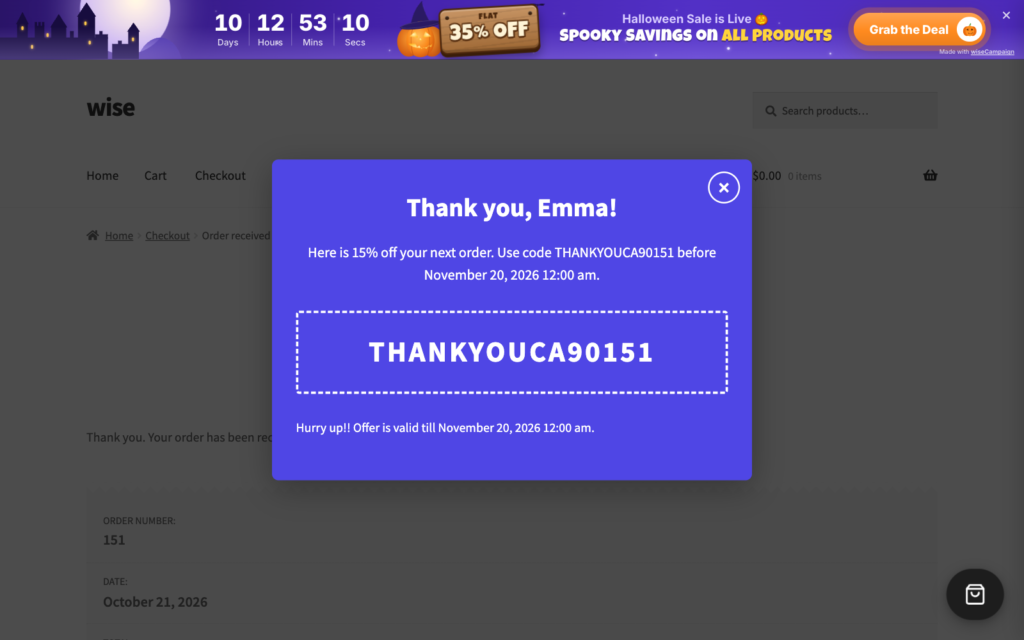
The best moment to plan the second order is right after the first one, when the customer is happy and engaged. A personal coupon, such as 15% off the next order within 30 days, gives them a reason and a deadline to return.
With wiseCampaign Pro: the Next Order Coupon discount creates a unique code for each customer after they buy. You choose:
- the code prefix (THANKYOU creates codes like THANKYOUCA90151), the discount and how many days the coupon stays valid
- a minimum cart subtotal to use it and how many times each code can be used
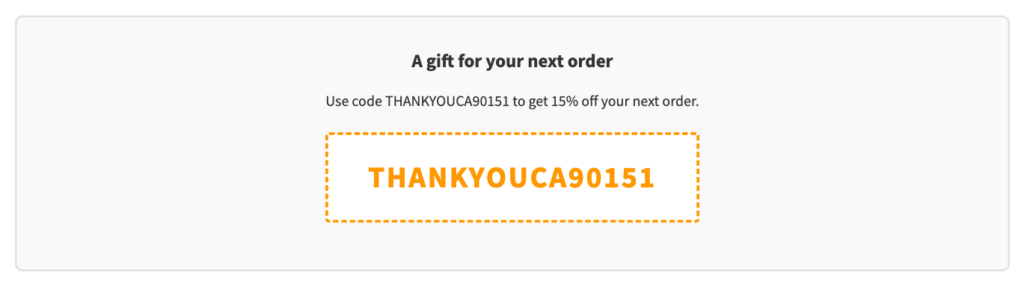
- how customers get it: a popup or an inline box on the Order Received page, inside the WooCommerce order email, or as a separate email
- generation rules: no new coupon for orders that used one, a cooldown between coupons, a lifetime limit per customer and a minimum order value to earn one
You can also promote the offer before the purchase, with a message on the product page such as “Order today and get 15% off your next order”. Setting a minimum order value to earn the coupon turns it into a reason to spend a little more today, too.
3. Send a simple post-purchase email series
Three or four emails after the order do more for loyalty than a weekly newsletter most people skip:
- Thank you, right after the order, with what happens next.
- How to get the most from your product, after delivery: care tips, how-to videos, sizing help.
- Review request, a week or two after delivery.
- A reminder of the next order coupon a few days before it expires.
4. Remind customers before they run out
If you sell things people use up, such as coffee, skincare, supplements, pet food or filters, you know roughly when they will need more. Send a reorder reminder shortly before then, with a direct link to the product. Timed well, it feels like a service, not a promotion.
5. Make reordering one click
WooCommerce shows an Order again button on completed orders in the customer’s My Account area, which adds the same items to the cart. Link to My Account → Orders from your reminder emails, and make sure customers know they can create an account, ideally after checkout, so it never slows down the first order.
6. Offer subscriptions for regular purchases
For products bought on a schedule, a subscription turns repeat purchases into automatic ones. Offer it as an option on the product page, often with a small saving, and make it easy to pause or cancel so customers feel safe signing up. WooCommerce needs a subscriptions extension for this.
7. Reward loyal customers
A points or rewards program gives customers a reason to choose you over a competitor next time. If a full program is too much to start with, give registered customers something simple: an exclusive price or early access to sales.
With wiseCampaign Pro: every Discount Manager rule has a For Which Users? setting. Set it to the Customer role, which WooCommerce gives to registered customers, and the offer only applies when they are logged in.
8. Recommend what to buy next
Use what customers bought to suggest what fits with it: the matching case for the phone, the refill for the bottle, the next book in the series. WooCommerce’s cross-sells and upsells (in each product’s Linked Products tab) cover the store side; your post-purchase emails can do the same after the order.
9. Bring past customers back for seasonal sales
Black Friday and Christmas are the easiest times to win back customers who haven’t ordered in a while. Email them first, give them early access, and remind them of what they bought last time. Our WooCommerce Black Friday checklist and Christmas sale ideas cover how to prepare those campaigns.
10. Ask for feedback, and act on it
Customers who don’t come back rarely say why. Ask: a one-question survey after delivery (“How likely are you to buy from us again?”) or a short email to customers who haven’t ordered in six months. Fix the issues that come up more than once, and tell customers what you changed.
Repeat purchase tactics at a glance
| Tactic | Best for | How |
|---|---|---|
| Next order coupon | Every store | wiseCampaign Pro: Next Order Coupon |
| Post-purchase emails | Every store | Your email marketing tool |
| Reorder reminders | Consumables | Email automation timed to usage |
| One-click reorder | Stores with customer accounts | WooCommerce “Order again” in My Account |
| Subscriptions | Products bought on a schedule | A WooCommerce subscriptions extension |
| Registered customer pricing | Stores building loyalty | wiseCampaign Pro: For Which Users? → Customer |
| Seasonal win-back | Customers who haven’t ordered recently | Early access emails before big sales |
Frequently asked questions
How do I see repeat customers in WooCommerce?
Go to WooCommerce → Analytics → Customers. The report shows each customer’s number of orders, total spend and average order value. Sort by Orders to find customers who have bought more than once.
What is a good repeat customer rate?
It depends heavily on what you sell. Stores selling consumables naturally see more repeat orders than stores selling furniture or electronics. Measure your own rate today and track whether it rises month over month.
What is a next order coupon?
A next order coupon is a personal discount code a customer receives after placing an order, valid on their next purchase. It gives customers a reason to come back, usually within a set number of days.
Can wiseCampaign email the next order coupon to customers?
Yes. wiseCampaign Pro can add the coupon to the WooCommerce order email or send it as a separate email with its own subject and heading. It can also show the code in a popup or an inline box on the Order Received page.
How do I stop customers from getting endless next order coupons?
wiseCampaign’s coupon generation rules handle this: Prevent Infinite Loop gives no new coupon for orders that used a next order coupon, a cooldown period sets the minimum days between coupons, and a lifetime limit caps how many one customer can get.
Is the Next Order Coupon feature free?
No. Next Order Coupon is part of the Discount Manager in wiseCampaign Pro, which starts at $59 per year with a 14-day money-back guarantee.
Turn first orders into second orders
Start with two things this week: a next order coupon that every customer gets after checkout, and a short post-purchase email series. Measure your repeat customer rate now and again in three months; it is one of the most valuable numbers in your store.

Leave a Reply