Show the product in use
A short video answers what photos leave open: the size on a real person, how it moves, what fits inside, how it works. Your product video plays first in the gallery.
Product video, then your photos, then more videos

|

WiseVideo Commerce puts product videos in your WooCommerce gallery and a row of vertical reels under Add to Cart. Shoppers see the product in use, and a Buy Now card on the video lets them buy without looking for the button. No code.
Cyber Week
80% off your first year of any Pro plan. Code BFCM80 is applied at checkout until December 5.
“Leather Weekender” has been added to your cart. View cart
Leather Weekender
$249.00
Tagged with Reels
A live demo of a product page with WiseVideo Commerce. Click a reel to open the viewer, then Buy Now. Switch to Phone to see the Buy Now card on the main video. Products with options scroll to the options instead of adding straight away.
WiseVideo Commerce is the shoppable video module of wiseCampaign Pro, a WooCommerce plugin by Wisemattic. It adds product videos to the WooCommerce product gallery and a row of vertical reels under the Add to Cart button, with a product card and Buy Now button on the video.
You add the videos on each product’s edit screen, from your WordPress Media Library. Shoppers watch them on the product page, and Buy Now puts a simple product in the cart or takes them to the options of a variable product.
Shoppable video is video with a way to buy right on it. Reels are short vertical clips, often made by customers or creators (UGC).
Page updated
Photos show what a product looks like. Video shows what it is like to use it. WiseVideo Commerce changes three things on the product page, where the decision to buy is made.
A short video answers what photos leave open: the size on a real person, how it moves, what fits inside, how it works. Your product video plays first in the gallery.
Product video, then your photos, then more videos
Reels sit right under Add to Cart. Clips from customers or creators show the product on real people at the moment the shopper decides.
Tagged with Reels, playing muted while on screen
The product card with the photo, price and Buy Now sits on the video in the reels viewer, and on phones on the main video. No scrolling back to find the button.
Watch → Buy Now → in the cart
Revenue is visitors × conversion rate × average order value. WiseVideo Commerce works on conversion: more of the shoppers who reach a product page decide to buy it. Each video sells the product it is on, so to make each order bigger, pair it with the wiseCart free shipping progress bar and Discount Manager bulk pricing. More ideas: how to increase WooCommerce average order value.
A product video gallery, shoppable reels and a Buy Now card, set up from one dashboard with a live preview. Every feature here is part of wiseCampaign Pro.
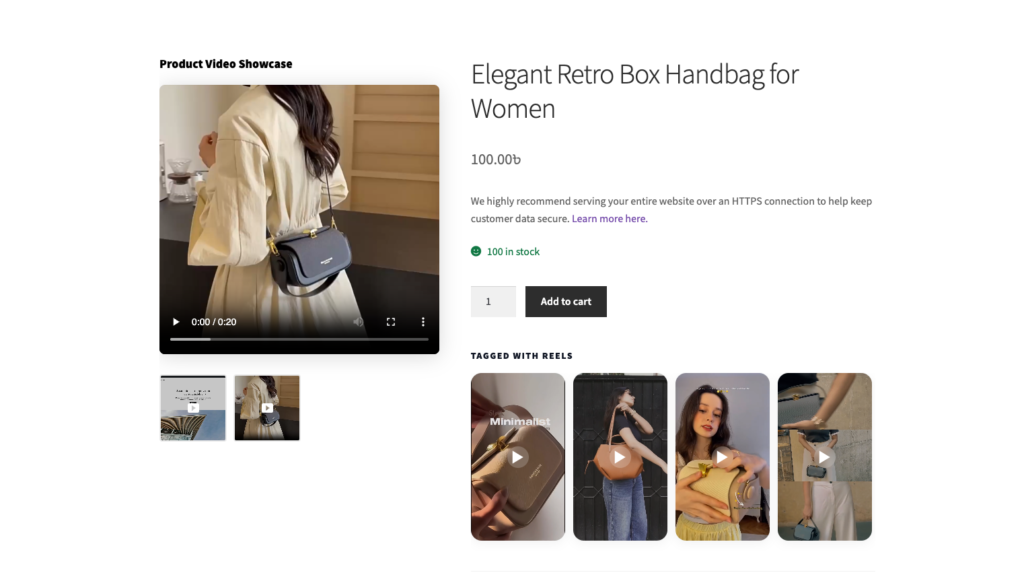
WiseVideo Commerce works on single product pages, through the WooCommerce product page hooks. Products with videos get a video gallery; products without keep their usual gallery.
An 86-second tour of every wiseCampaign module. The video starts at the part about Product Table, WiseVideo and Analytics.
Where the reels go, how you add videos to a product, and what you can switch on or off.
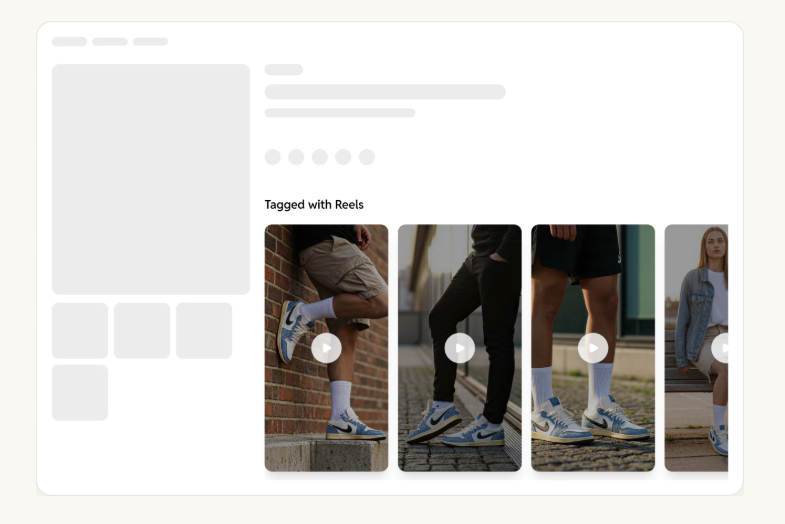
Reels sit under the Add to Cart form: vertical clips that show the product on real people. A click opens the reels viewer with the Buy Now card on the video.
WiseVideo Commerce adds three boxes to the right column of the WooCommerce product editor. Pick videos from the Media Library, click Update, and they show on that product’s page.
Go to WiseCampaign > WiseVideo Commerce. Three tabs hold every setting, next to a live preview of a product page and of the reels viewer, on desktop or mobile.
You need the free wiseCampaign plugin, wiseCampaign Pro and an active license key.
Install wiseCampaign from Plugins > Add New, then upload wiseCampaign Pro and enter the license key from your purchase email.
Go to WiseCampaign > WiseVideo Commerce and turn it on. Choose the parts you want, the thumbnail layout and the card colors, then click Save Changes.
Open a product in Products > Edit. In the right column, set a product video, add gallery videos or reels, and click Update.
The free plugin gives you the side cart, Buy Now button, stock bars and sales popups. WiseVideo Commerce is part of Pro, which runs on top of the free plugin. Without Pro, its dashboard shows a locked preview.
| Feature | Free | Pro |
|---|---|---|
| wiseCart side cart, Direct Checkout Buy Now, StockBar and sales popups | ✓ | ✓ |
| Product video and gallery videos in the product gallery | — | ✓ |
| Product reels under Add to Cart, with autoplay | — | ✓ |
| Reels viewer with sound, next and previous | — | ✓ |
| Buy Now product card on the video | — | ✓ |
| 3 thumbnail layouts, card colors and headings | — | ✓ |
| Discount Manager: BOGO, bulk pricing, spend & save and more | — | ✓ |
| Analytics: views, clicks and adds to cart per module | ✓ | ✓ |
| Analytics: orders and revenue per module, with 30- and 90-day ranges | — | ✓ |
Personal
$59 per year
1 site
Small Business
$149 per year
5 sites
Agency Plus
$299 per year
Up to 100 sites
Every plan includes WiseVideo Commerce and every other Pro module. Compare Free and Pro in full.
Cyber Week: 80% off your first year with code BFCM80, applied at checkout until December 5.
14-day money-back guarantee. Secure checkout by Lemon Squeezy.
Reviews of the wiseCampaign plugin on WordPress.org, where it is rated 5.0 out of 5.
Great Plugin for Boosting WooCommerce Sales
wiseCampaign is an excellent plugin for creating flash sales, countdown timers, and attractive discount offers. The features are useful for increasing customer engagement and encouraging more purchases. Highly recommended for any WooCommerce store owner!
Great for Countdown timer and Sales notifications.
wiseCampaign is a useful WooCommerce plugin for running flash sales and promotional campaigns. The countdown timer and sales notification features are particularly impressive, helping create urgency and boost customer engagement. Easy to use and a great addition to any WooCommerce store!
Must-Have Plugin!
wiseCampaign makes creating banners and managing campaigns so easy! Great features, simple setup, and excellent targeting options.
About WiseVideo Commerce, product video galleries and shoppable reels.
WiseVideo Commerce is the shoppable video module of wiseCampaign Pro, a WooCommerce plugin by Wisemattic. It adds product videos to the WooCommerce product gallery and a row of vertical reels under Add to Cart, with a product card and Buy Now button on the video in the reels viewer and, on phones, on the main gallery video.
No. It is part of wiseCampaign Pro, from $59 per year, which runs on top of the free wiseCampaign plugin from WordPress.org. The free plugin shows the WiseVideo Commerce dashboard with a locked preview, and the module can only be switched on with an active Pro license.
With Pro active, go to WiseCampaign > WiseVideo Commerce and switch it on. Then open a product in Products > Edit. In the right column, set a product video, add gallery videos or add reels from your Media Library, and click Update. The videos show on that product’s page.
The product whose page the video is on. Buy Now adds a simple, in-stock product to the cart right away. For variable and other product types, it scrolls to the product options and focuses the first one, so the shopper can choose a size or color first. The same video file can be added to several products.
No. WiseVideo Commerce plays video files from your WordPress Media Library in the browser’s own video player, so there are no third-party ads or suggested videos on your product page. MP4 is the format that plays in the most browsers.
Yes, if you leave Play reels automatically on. Reels then play muted and on loop, only while at least half of a reel is on screen, and pause when it scrolls away. A click opens the reels viewer with sound on, a mute button, next and previous buttons and arrow-key support.
WiseVideo Commerce loads its script and styles only on single product pages. Gallery videos and reels load only their metadata and a preview frame until they play, autoplaying reels play only while on screen, and the reels viewer loads a video only when it opens.
On screens narrower than 768 pixels, the product card with Buy Now sits on the main gallery video whenever a video shows, so shoppers can buy without scrolling. Reels scroll sideways with a swipe, and the reels viewer fits the screen in a vertical 9:16 frame.
Yes. wiseCampaign Analytics counts plays started from a thumbnail or a reel, Buy Now clicks and adds to cart from a video. With Pro it also shows orders and revenue: orders with a product added from a video, and orders placed within 7 days after the shopper played a video. Refunds and cancellations come off the numbers.
Your product pages go back to the normal WooCommerce gallery, without reels. The videos stay attached to your products, so they show again when the license is active. If you deactivated the license or the Pro plugin, switch WiseVideo Commerce on again in its dashboard.
One plugin, one dashboard. Turn on the modules you need.