One click instead of three
By default, WooCommerce shoppers click Add to cart, then View cart, then Proceed to checkout. Buy Now puts the product in the cart and opens checkout in one click.
Product page → Checkout

|

Direct Checkout adds a one-click Buy Now button to your product and shop pages. It puts the product in the cart and takes the shopper straight to checkout. Free in wiseCampaign, with more styles, animations and placements in Pro.
Cyber Week
80% off your first year of any Pro plan. Code BFCM80 is applied at checkout until December 5.
“Wireless Headphones” has been added to your cart.
Home / Shop / Audio
Wireless Headphones
(24 reviews)
$129.00 $99.00
Noise cancelling over-ear headphones with 40 hours of battery.
Checkout reached in 1 click. The cart page was skipped.
Try the real options
Colors Free
Button style Classic is free
Icon Pro
Attention animation Pro
Loops on the button to catch the shopper’s eye.
Hover effect Pro
Plays when the shopper points at the button. The attention animation stops while it plays.
Product page placement After Add to Cart is free
After click, send shoppers to Free
The plugin can also send shoppers to any page on your site or a custom URL.
Pro options in this demo: Rounded Pill style, Bolt icon, Pulse animation, Lift hover effect. See Pro plans →
A live demo of the Direct Checkout button. Change the options, then click Buy Now or Add to cart to compare the two paths.
Direct Checkout is the Buy Now button module of wiseCampaign, a WooCommerce plugin by Wisemattic. It adds a Buy Now button next to Add to cart on product pages and under products in the shop grid. One click puts the product in the cart and opens the checkout page, so the shopper skips the cart page.
It suits products that people buy on their own: a single item, a gift, a reorder, or a product a visitor found through an ad or a social post. Shoppers who want to keep browsing still have the Add to cart button.
Page updated
Every page between “I want this” and “Place order” is a chance to leave. Baymard Institute puts the average online cart abandonment rate at about 70%. A Buy Now button takes the cart page out of the path for shoppers who already know what they want.
By default, WooCommerce shoppers click Add to cart, then View cart, then Proceed to checkout. Buy Now puts the product in the cart and opens checkout in one click.
Product page → Checkout
On screens 768px wide or narrower, the button spans the full width of the product form, right under Add to cart, where a thumb can reach it.
Full width on mobile
Buy Now sits next to Add to cart, not in its place, so shoppers who want more than one item can still fill a cart. wiseCart’s free shipping bar can then nudge them to add one more.
Add to cart stays
Buy Now turns more visits into orders. To make each order bigger, pair it with wiseCart and the Discount Manager.
How quick buy buttons improve conversion rates → How to reduce cart abandonment → How to increase average order value →
Edit it all in one editor with a live preview of your product page and shop page, on desktop and mobile.
Turn on product pages, shop pages or both in the Settings tab. The button uses your theme’s fonts, with your colors.
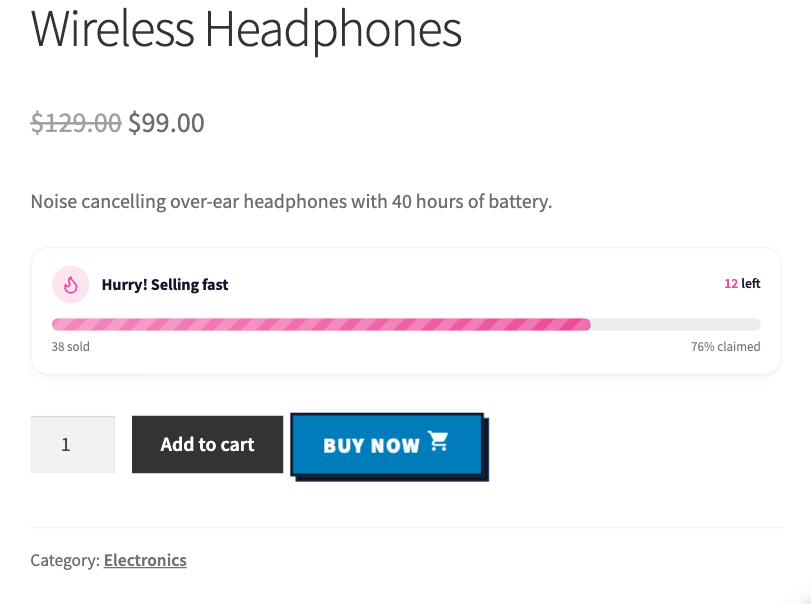
On single product pages, the button sits right after Add to cart. With Pro, choose one of four more placements.
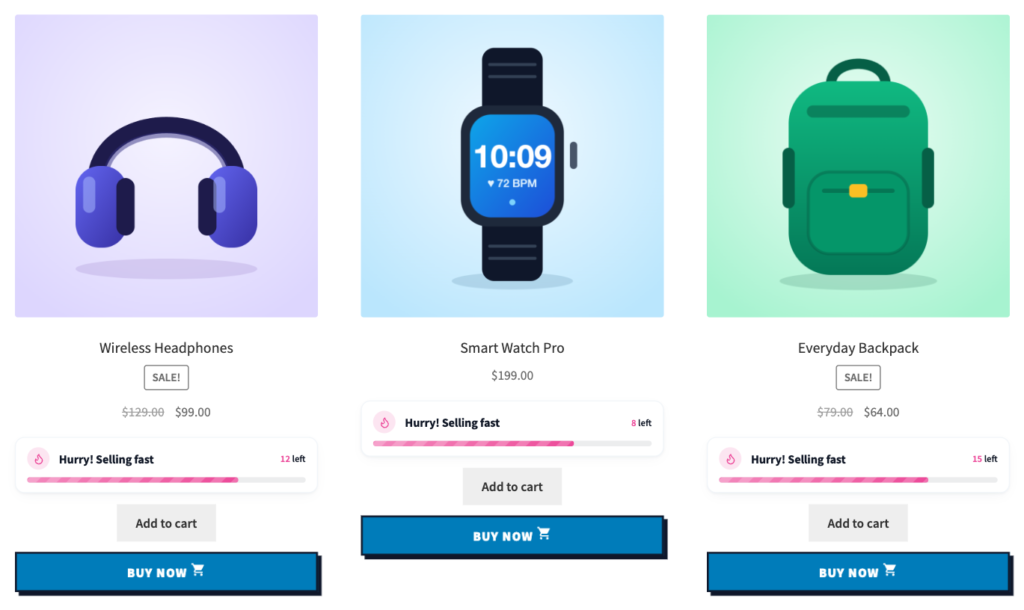
Turn on Shop & archive pages and the button shows under each simple product on your shop, category and tag pages. Products with options, such as a size or a color, keep WooCommerce’s own button there.
Classic is free. Pro adds seven more styles, icons and all the motion. Every style takes its colors from your color settings. Point at a button to see its hover.
They loop on the button to catch the shopper’s eye.
They play when the shopper points at the button, and the attention animation pauses while they play: Lift, Grow, Shine, Glow and Icon Pop (for buttons with an icon).

The product tour shows every module. Direct Checkout and wiseCart start at 0:38.
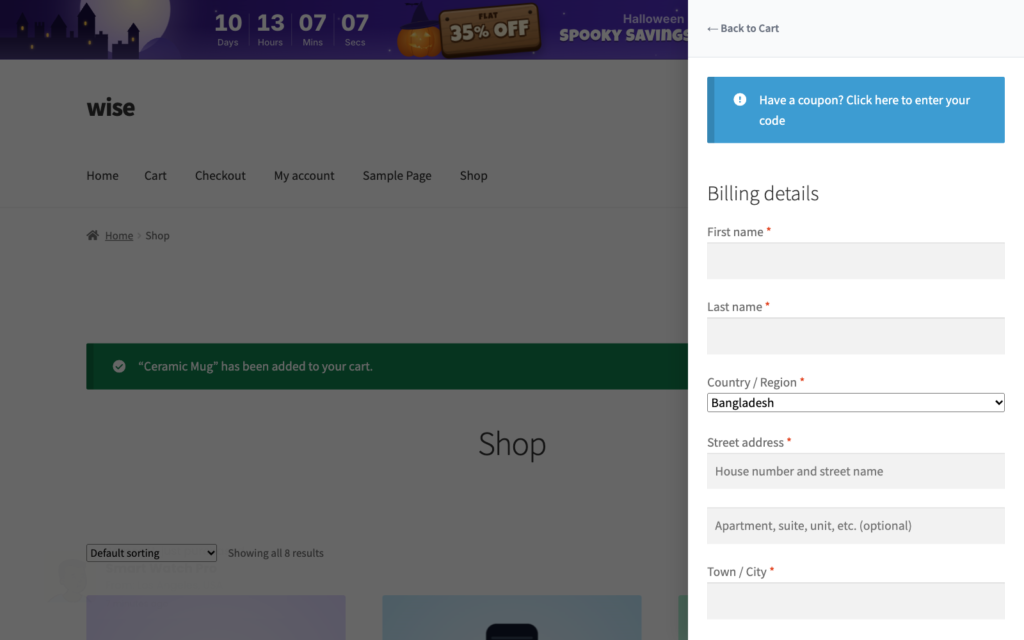
Turn on wiseCart, the free slide-out cart in wiseCampaign, and a Buy Now click no longer opens a separate checkout page. The shopper lands on your shop with the cart drawer open on its checkout form.
The Direct Checkout editor has a performance card at the top, and WiseCampaign > Analytics compares every module.

Install wiseCampaign, then go to WordPress Dashboard > WiseCampaign > Direct Checkout. Everything below happens in that one editor.
Click the Direct Checkout switch at the top of the editor until it says Currently Active.
On the Design tab, write the button text and pick your colors or a preset. With Pro, choose a style, an icon and an animation.
On the Settings tab, turn on Single product pages, Shop & archive pages or both, choose where shoppers go after the click, and click Save Changes.
Pro adds the extra styles, icons, motion, placements, and the orders and revenue in Analytics.
| Feature | Free | Pro |
|---|---|---|
| Buy Now on single product pages | ✓ | ✓ |
| Buy Now on shop, category and tag pages (simple products) | ✓ | ✓ |
| Button text, colors and 7 color presets | ✓ | ✓ |
| Send shoppers to checkout, the cart, any page or a custom URL | ✓ | ✓ |
| Classic button style | ✓ | ✓ |
| 7 more styles: Rounded Pill, Outline, Gradient Shine, 3D Raised, Soft Glow, Soft Tint, Bold Block | — | ✓ |
| Button icons on the left or right | — | ✓ |
| 8 attention animations | — | ✓ |
| 5 hover effects | — | ✓ |
| Placement after Add to cart | ✓ | ✓ |
| Before, side by side, below, or replace Add to cart | — | ✓ |
| Checkout inside the wiseCart drawer | ✓ | ✓ |
| Analytics: pages with the button and Buy Now clicks | ✓ | ✓ |
| Analytics: orders and revenue from Buy Now | — | ✓ |
Pro unlocks every wiseCampaign module too, including the Discount Manager. From $59 per year, with a 14-day money-back guarantee.
Reviews from WordPress.org, where wiseCampaign is rated 5.0 out of 5.
Great Plugin for Boosting WooCommerce Sales
wiseCampaign is an excellent plugin for creating flash sales, countdown timers, and attractive discount offers. The features are useful for increasing customer engagement and encouraging more purchases. Highly recommended for any WooCommerce store owner!
Great for Countdown timer and Sales notifications.
wiseCampaign is a useful WooCommerce plugin for running flash sales and promotional campaigns. The countdown timer and sales notification features are particularly impressive, helping create urgency and boost customer engagement. Easy to use and a great addition to any WooCommerce store!
Must-Have Plugin!
wiseCampaign makes creating banners and managing campaigns so easy! Great features, simple setup, and excellent targeting options.
About Direct Checkout, the one-click Buy Now button in wiseCampaign.
A Buy Now button lets a shopper buy a product without stopping at the cart page. In wiseCampaign, the Direct Checkout module adds it next to Add to cart on product pages and under products in the shop grid. One click puts the product in the cart and opens the checkout page.
Install the free wiseCampaign plugin, go to WiseCampaign > Direct Checkout and turn on the switch. Set the button text and colors on the Design tab, turn on Single product pages, Shop & archive pages or both on the Settings tab, and click Save Changes. No code is needed.
Yes. The free version includes the Buy Now button on product and shop pages, your own text and colors, the Classic style and the choice of where shoppers go after the click. wiseCampaign Pro, from $59 per year, adds 7 more styles, icons, 8 attention animations, 5 hover effects, 4 more product page placements, and orders and revenue in Analytics.
Yes, by default. The button adds the product to the cart and sends the shopper straight to the checkout page. You can also send shoppers to the cart page, any page on your site or a custom URL. The product is added to the cart first in every case.
On single product pages, next to Add to cart, and on shop, category and tag pages, under each simple product. Turn each location on or off in the Settings tab. Products with options, such as a size or a color, keep WooCommerce’s own button in the shop grid.
Yes, with wiseCampaign Pro. Choose Replace Add to Cart under Product Page Placement and product pages show only the Buy Now button. The other Pro placements are Before Add to Cart, Side by Side, and Below, Full Width. In the shop grid, Add to cart stays.
Yes. On screens 768px wide or narrower, the button takes the full width of the product form, below Add to cart, so it is easy to tap. The editor has a mobile preview, so you can check it before you save.
Yes, with wiseCart, the free slide-out cart in wiseCampaign. When wiseCart shows the checkout inside the cart, which is its default, a Buy Now click opens the cart drawer on its checkout form, so shoppers can pay without leaving the page.
Buy Now is built to win more orders, not bigger ones: it helps shoppers who have chosen a product to pay quickly. Keep Add to cart next to it, which is the default, so shoppers who want more items can still fill a cart, and use wiseCart’s free shipping progress bar or Discount Manager deals to grow those orders.
The Direct Checkout editor shows how many pages showed the button and how many times it was clicked. With Pro, it also shows the orders and revenue from products bought with Buy Now, and WiseCampaign > Analytics compares the average order value of wiseCampaign orders with your other orders. Only daily totals are stored, in your own WordPress database.
One plugin, one dashboard. Turn on the modules you need.