WooCommerce Points and Rewards: a Loyalty Program That Brings Customers Back
wiseRewards gives customers points for purchases, signups and reviews, and lets them pay with points in the cart and at checkout. Free, no code. Pro adds referrals, birthday points, VIP tiers, double points campaigns and analytics.
Cyber Week80% off your first year of any Pro plan. Code BFCM80 is applied at checkout until December 5.
★★★★★5.0 on WordPress.org•Points and rewards included in the free version•Built for WooCommerce•14-day money-back guarantee
yourstore.com/product/leather-weekender-bag
👜
Leather Weekender Bag
$120.00
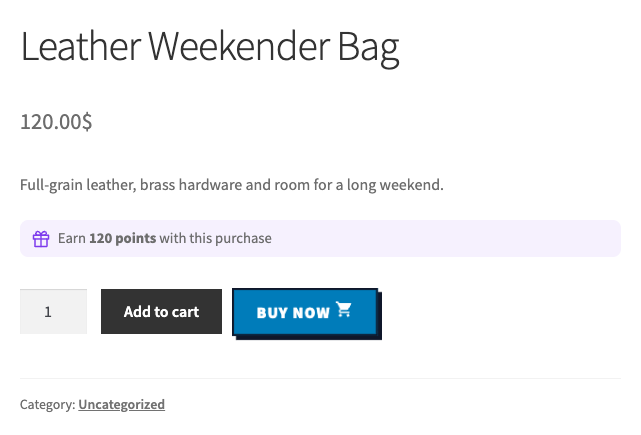
Earn 120 points with this purchase
2
Emma’s balance 1,250 pointsBronze · 1×
Cart totals
Leather Weekender Bag × 2$240.00
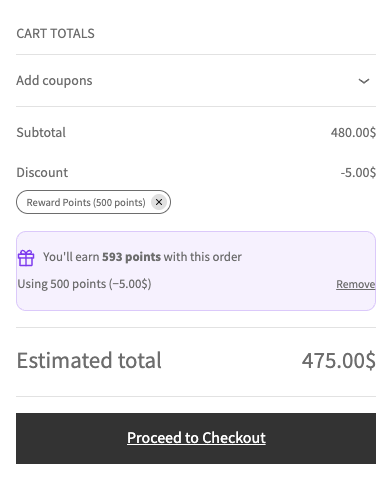
Reward Points (500 points)−$5.00
You’ll earn 240 points with this order
You have 1,250 points worth $12.50.
Up to 1,250 points ($12.50) on this order.
Using 500 points (−$5.00)
Total$240.00
Try the boosts:
A live demo with 1 point per $1 and 100 points = $1 off. Change the quantity, use some points, or turn on a boost and watch what the order earns.
At a glance
What is wiseRewards?
wiseRewards is the WooCommerce points and rewards module of wiseCampaign, a plugin by Wisemattic. Customers earn points when they buy, sign up and review products, and pay with them on their next order, in the cart or at checkout.
Points are worked out from what customers really pay, arrive when the order is completed, and come back off when an order is refunded or cancelled. Your customers see your own program name, such as Reward Points, never the wiseCampaign name.
A points program is also called a loyalty program or a rewards program. wiseRewards is free on WordPress.org; wiseCampaign Pro adds referrals, birthdays, VIP tiers, campaigns and analytics.
Purchases, signups and reviews (free). Referrals and birthdays (Pro)
Use points
In the cart and at checkout, classic or block, like a coupon
My Account
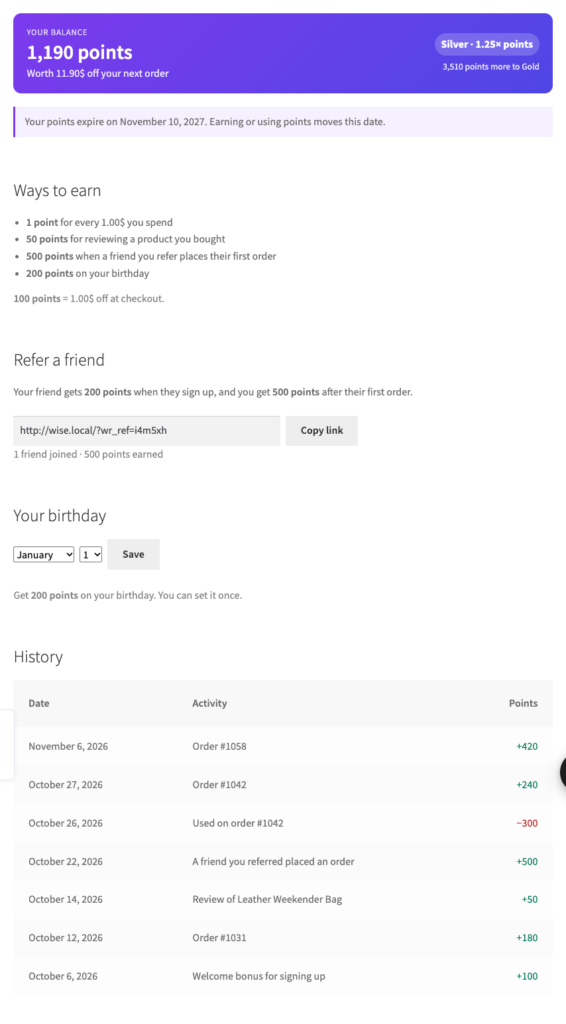
Balance, ways to earn and the full points history
Boosts
VIP tiers and double points campaigns (Pro)
Analytics
Orders paid with points, revenue and what unused points are worth (Pro)
Price
Free on WordPress.org. Pro from $59 per year
Version
wiseCampaign 2.2.0
Repeat customers
How does a points program increase WooCommerce sales?
Winning a new customer costs far more than keeping one. Points give the customers you already have three reasons to buy again.
A reason to come back
Every order leaves points in the customer’s account, worth money off the next one. A balance they can see in My Account is a reason to shop with you again instead of a store they don’t know.
1,250 points = $12.50 off the next order
A reason to buy now
Product pages and the cart show what the purchase earns before the customer pays. A visible reward makes the order feel like a better deal, without a discount on the price.
Earn 120 points with this purchase
A reason to spend more
With Pro, customers move up tiers as they earn and get more points on every order, and campaigns such as double points weekends give them a date to shop.
Gold tier: 1.5× points on every purchase
Points cost you only when they are used, and only as much as you set: with 1 point per $1 and 100 points = $1, customers get 1% back. Unused points can expire after months without activity. More ideas: how to increase WooCommerce average order value.
Features
Everything in wiseRewards
Earning, spending and the customer’s account are free. Pro adds referrals, birthdays, tiers, campaigns and analytics.
Points for purchasesFreePoints for every amount spent, such as 1 point per $1, from the price after discounts, without tax and shipping.
Signup and review pointsFreeA welcome bonus that can wait for the first order, and points for approved reviews from verified buyers, once per product.
Pay with pointsFreeCustomers use points in the cart and at checkout, classic or block. Set what they are worth, a minimum and a maximum share of the order.
“Earn X points” messagesFreeOn product pages (following the chosen variation), in the cart, at checkout and in the wiseCart drawer, in your own words.
My Account pageFreeThe balance and what it is worth, ways to earn, when points expire and the full history.
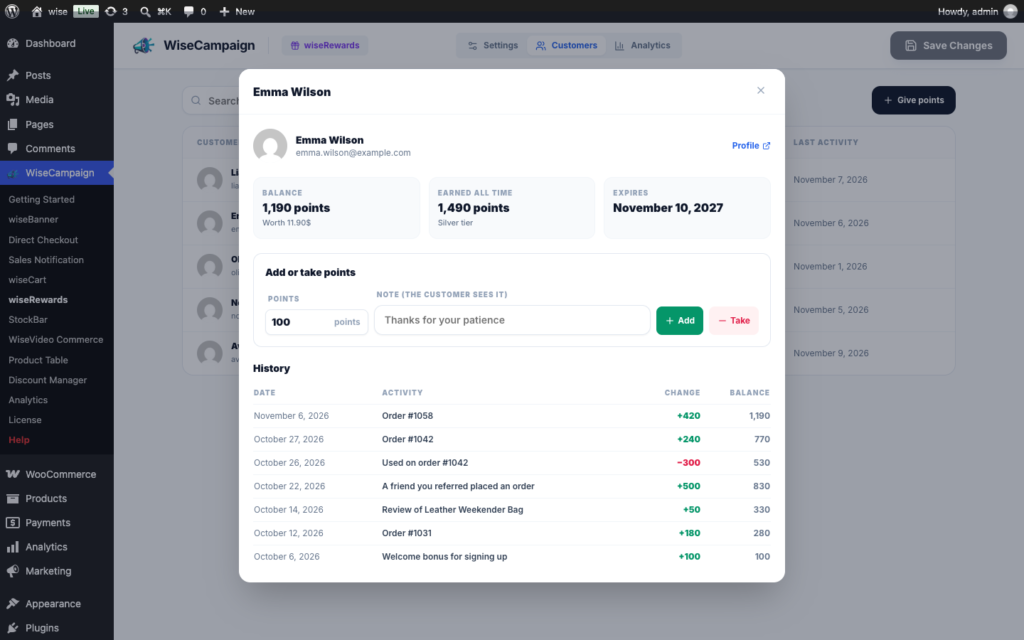
Customers listFreeEvery customer’s balance and history, with points you add or take away and a note they can see.
Points expiryFreeBalances can expire after months without activity, so unused points don’t pile up on your books.
Refer a friendProA referral link in My Account. The friend gets points when they sign up, the customer after the friend’s first order.
Birthday pointsProCustomers save their birthday once and get points on the day, once a year.
VIP tiersProBronze, Silver, Gold or your own names, each with more points per purchase, and progress to the next tier in My Account.
Double points campaignsProExtra points between two dates, such as a double points weekend, on top of the tier bonus.
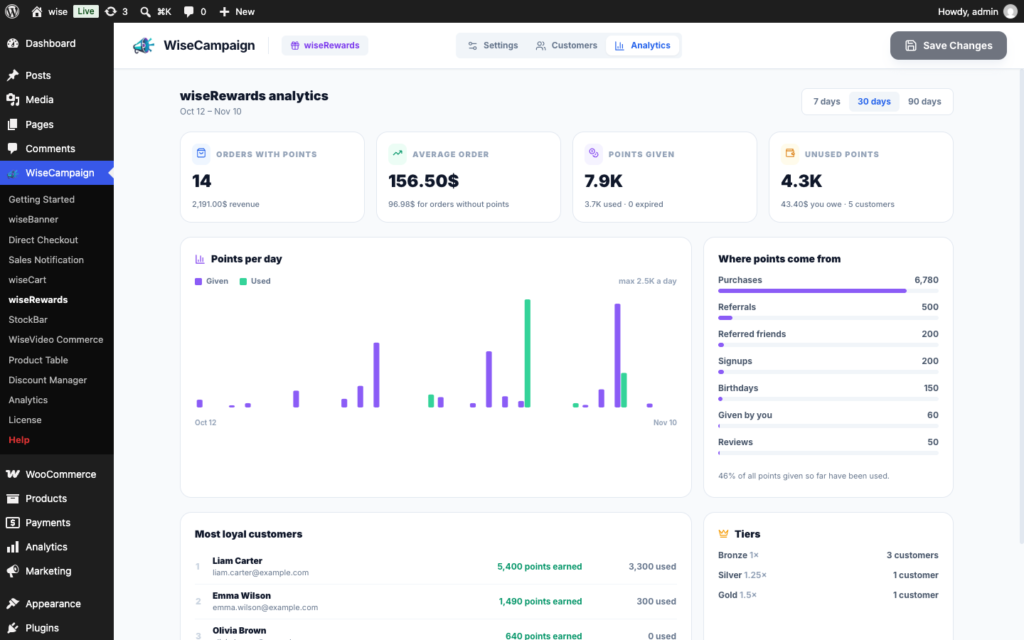
Points analyticsProRevenue and average order value of orders paid with points, points given and used per day, and your most loyal customers.
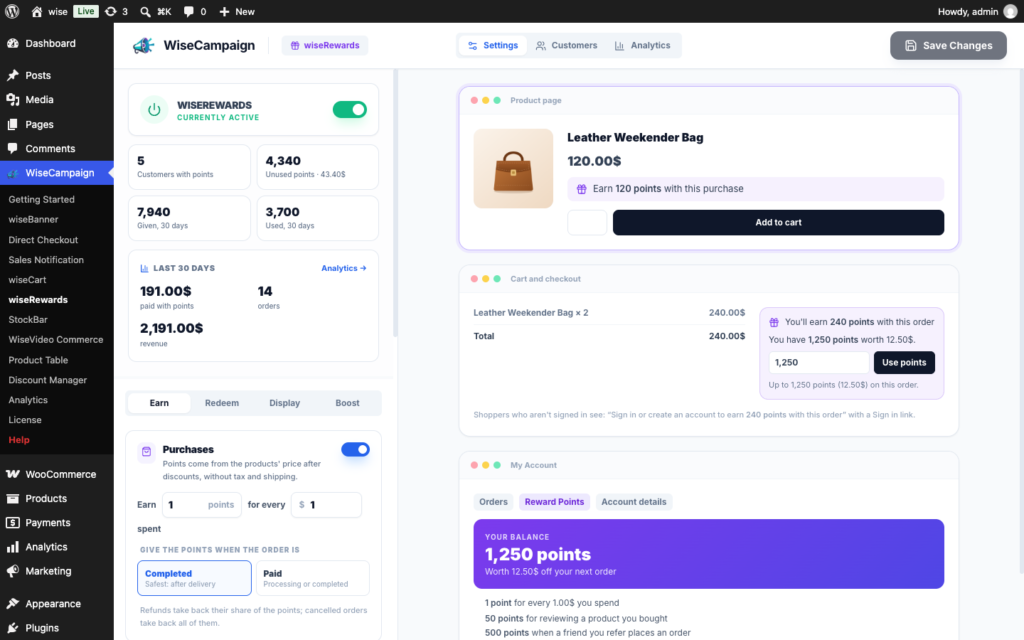
The wiseRewards settings, with a live preview of what customers see.
Fair by design
How do points work in WooCommerce?
You set two numbers: what customers earn (1 point per $1) and what points are worth (100 points = $1). wiseRewards keeps every order and every customer’s balance right from there.
Earned on what they pay: points come from the products’ price after coupons and discounts, without tax and shipping. The part paid with points earns nothing.
Arrive with the order: when it is completed, or paid if you prefer. A partial refund takes back its share; a cancelled or refunded order takes all of them.
Used like a coupon: points come off after your other coupons and Discount Manager discounts, and customers are only charged the points the discount needs.
Given back when it’s right: points used on a cancelled or fully refunded order go back to the customer. Every change is in the order notes and the customer’s history.
Safe from abuse: the signup bonus can wait for the first order, review points go to verified buyers once per product, and nobody can refer themselves.
Screenshots from a Storefront test store with wiseCampaign 2.2 turned on.
Product pageWhat the purchase earns, right above Add to cart.Cart and checkoutPoints used as a discount, and what the order earns.My AccountBalance, tier, referral link, birthday and history.
WiseCampaign • wiseRewards • Customers
Customers
Every customer’s points in one place
See who has points, how many they earned and used, and when they were last active. Open a customer for their full history.
✓Search and sort: by balance, points earned, points used or recent activity.
✓Add or take points: with a note the customer sees, for goodwill or a correction.
✓Personal data tools: the history is exported and erased with WordPress’s privacy tools.
WiseCampaign • wiseRewards • Analytics
Analytics Pro
See what your points bring in
wiseCampaign Pro shows whether the program pays for itself, over 7, 30 or 90 days.
✓Orders with points: their revenue, and their average order value next to orders without points.
✓Points per day: points given and used, and how many expired.
✓What you owe: unused points and what they are worth.
✓Your best customers: where points come from, tiers and the most loyal customers.
Getting started
Add a points and rewards program to WooCommerce in three steps
Install wiseCampaign from Plugins > Add New, then go to WordPress Dashboard > WiseCampaign > wiseRewards.
1
Choose how customers earn
On the Earn tab, set the points per amount spent, the signup bonus and the points for a review. The preview shows the product page message as you type.
2
Set what points are worth
On the Redeem tab, set the value (such as 100 points = $1), a minimum and how much of an order points can pay. Name your program on the Display tab.
3
Save and turn it on
Click Save Changes, then turn wiseRewards on. It stays off until you do, so nothing changes on your store before you are ready.
Pro unlocks every wiseCampaign module too, including the Discount Manager. From $59 per year, with a 14-day money-back guarantee.
Reviews
What store owners say about wiseCampaign
Reviews from WordPress.org, where wiseCampaign is rated 5.0 out of 5.
★★★★★
Great Plugin for Boosting WooCommerce Sales
wiseCampaign is an excellent plugin for creating flash sales, countdown timers, and attractive discount offers. The features are useful for increasing customer engagement and encouraging more purchases. Highly recommended for any WooCommerce store owner!
Saiful Islam · ★★★★★
Great for Countdown timer and Sales notifications.
wiseCampaign is a useful WooCommerce plugin for running flash sales and promotional campaigns. The countdown timer and sales notification features are particularly impressive, helping create urgency and boost customer engagement. Easy to use and a great addition to any WooCommerce store!
Mahmudur Rahman Labib · ★★★★★
Must-Have Plugin!
wiseCampaign makes creating banners and managing campaigns so easy! Great features, simple setup, and excellent targeting options.
About wiseRewards, earning and using points, and what Pro adds.
What is wiseRewards?
wiseRewards is the WooCommerce points and rewards module of the wiseCampaign plugin by Wisemattic. Customers earn points for purchases, signing up and reviewing products, and pay with them in the cart or at checkout. Customers see your own program name, such as Reward Points.
Is wiseRewards free?
Yes. Points for purchases, signups and reviews, paying with points in the cart and at checkout, the Reward Points page in My Account, the Customers list and points expiry are part of the free wiseCampaign plugin on WordPress.org. wiseCampaign Pro, from $59 per year, adds refer-a-friend links, birthday points, VIP tiers, double points campaigns and points analytics.
How do I add a points and rewards program to WooCommerce?
Install wiseCampaign from Plugins > Add New and go to WiseCampaign > wiseRewards. Set how customers earn on the Earn tab and what points are worth on the Redeem tab, name your program on the Display tab, click Save Changes and turn wiseRewards on. It stays off until you do.
How do customers earn points?
For every amount they spend, such as 1 point per $1, worked out from the products’ price after coupons and discounts, without tax and shipping. The points arrive when the order is completed, or when it is paid if you prefer. You can also give a signup bonus and points for approved product reviews, once per product and only from verified buyers if you like.
How do customers use their points?
In the cart and at checkout, on classic pages and in the Cart and Checkout blocks. Customers type how many points to use and click Use points, and the discount appears like a coupon, such as Reward Points (500 points). You set what points are worth, the fewest points per use and the largest share of an order points can pay.
What happens to points when an order is refunded or cancelled?
A partial refund takes back its share of the points the order earned, and a cancelled or fully refunded order takes all of them back. Points used on an order are given back when it is cancelled or fully refunded. Every change appears in the order notes and in the customer’s history.
Can points be used with coupons and discounts?
Yes. Points come off after your other coupons and wiseCampaign Pro’s Discount Manager discounts, and customers are only charged the points the discount needs. A coupon set to Individual use only can’t be combined with points, as with any other coupon. Coupons must be turned on in WooCommerce.
Does wiseRewards work with the WooCommerce Cart and Checkout blocks?
Yes. The points box and the earned points appear in the Cart and Checkout blocks and on the classic cart and checkout pages, and the points line is labeled with your program name.
Do points expire?
Only if you turn expiry on. Then a customer’s whole balance expires after the number of months you choose without earning or using points. Any activity moves the date forward, and customers see it in My Account.
How do referrals, birthdays and tiers work?
They are part of wiseCampaign Pro. Each customer gets a referral link in My Account: the friend gets points when they sign up and the customer gets points after the friend’s first order. Customers can save their birthday once to get points on the day. VIP tiers such as Bronze, Silver and Gold give more points per purchase as customers earn, and campaigns such as a double points weekend multiply points between two dates.