Bulk pricing
A price table next to the quantity box makes buying more look like the smart choice.
3–5 items: 5% off · 10+ items: 15% off

|


wiseCampaign adds bulk pricing, BOGO and bundle deals, a reward progress cart, countdown sale bars, stock scarcity bars, exit-intent popups and one-click checkout to your WooCommerce store, so shoppers add more to every order. One plugin, no code.
Cyber Week
80% off your first year of any Pro plan. Code BFCM80 is applied at checkout until December 5.
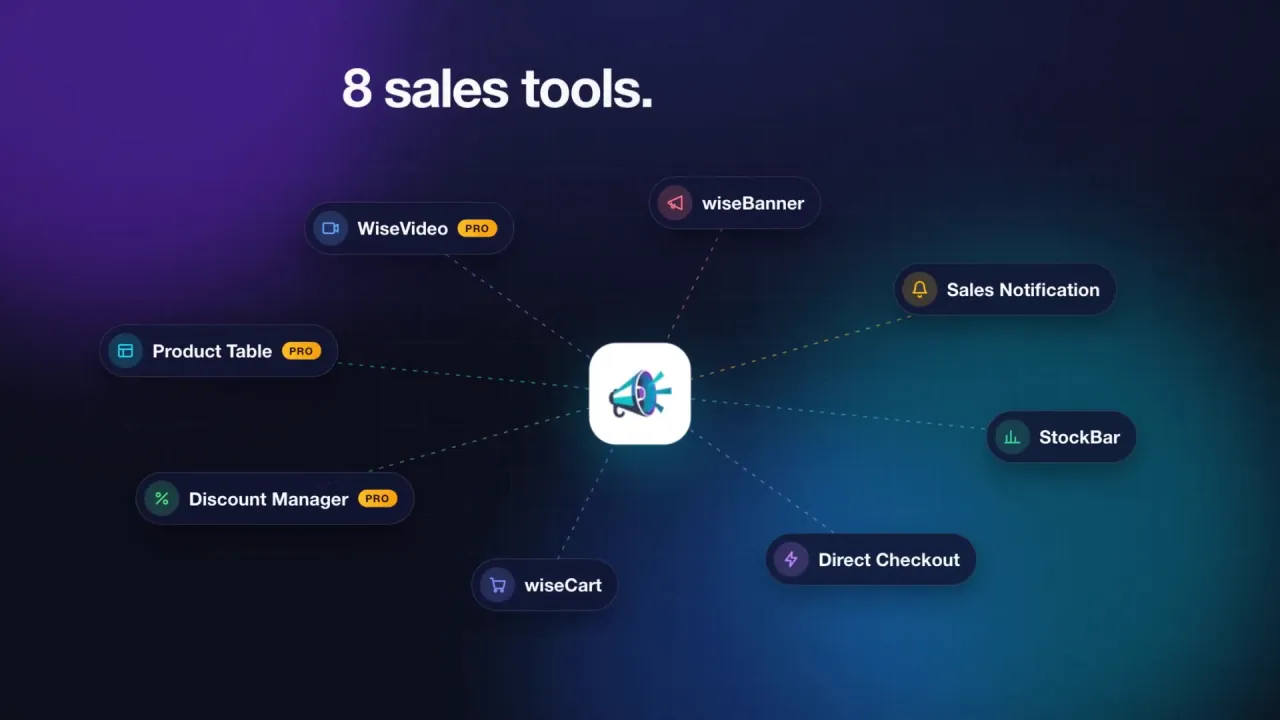
wiseCampaign is a WordPress plugin that helps WooCommerce stores increase their average order value and conversion rate. It puts nine sales tools in one plugin: automatic discount rules, a slide-out cart with a reward progress bar, a points and rewards program, countdown sale bars with exit-intent popups, stock scarcity bars, one-click Buy Now buttons, sales notification popups, product tables and shoppable video.
Each tool is a module you switch on or off. A module that is off does not load on your store. The free version is on WordPress.org. wiseCampaign Pro adds the Discount Manager, Product Table, WiseVideo Commerce, wiseRewards referrals and tiers, premium templates, and order and revenue analytics.
Page updated
Average order value (AOV) is your revenue divided by your number of orders. Each of these discount types gets shoppers to add one more item, pick a bigger pack or pass a spend goal, and each one applies automatically in the cart, with no coupon code.
A price table next to the quantity box makes buying more look like the smart choice.
3–5 items: 5% off · 10+ items: 15% off
Classic BOGO deals turn a single item into two or three in the same order.
Buy 2 tees, get 1 free
Sell a set at one price, so the bundle is a better deal than buying one.
Any 3 mugs for $45
Reward a bigger basket with a discount once the cart passes an amount you choose.
Spend $100, get 10% off
Give a discount when shoppers buy a set quantity of a product or category.
Buy 2, save 20%
Every buyer gets a personal coupon after checkout, in a thank-you popup and by email, so they come back.
Here is 15% off your next order
The Discount Manager also has a seventh type, Simple: a percentage or fixed discount on products, categories or the whole store.
Enter your own numbers. The estimate uses only what you type here, and nothing is sent anywhere.
This is an estimate, not a promise. Your result depends on your products, prices and offers. wiseCampaign Analytics shows the real change after you launch an offer.
Your store
At this rate, the Personal plan ($59 per year) pays for itself after 10 orders.
Many stores stitch five or more plugins together for this. wiseCampaign covers each step with modules that share one dashboard, one design system and one Analytics view.
A wiseBanner sale bar with a countdown and a click-to-copy coupon. Sales notifications show recent orders.
StockBar shows items left and sold. Product tables and shoppable video help shoppers compare.
Bulk price tables, BOGO and bundle badges, and a Buy Now button that skips the cart page.
The wiseCart reward progress bar, a “You save” total and checkout inside the cart.
An exit-intent popup with a last-chance coupon, at most once per visit.
wiseRewards points to spend next time, and a next-order coupon by email, bring the buyer back.
Shoppers see the offer before they reach the cart, so they add the extra item instead of hunting for a code.
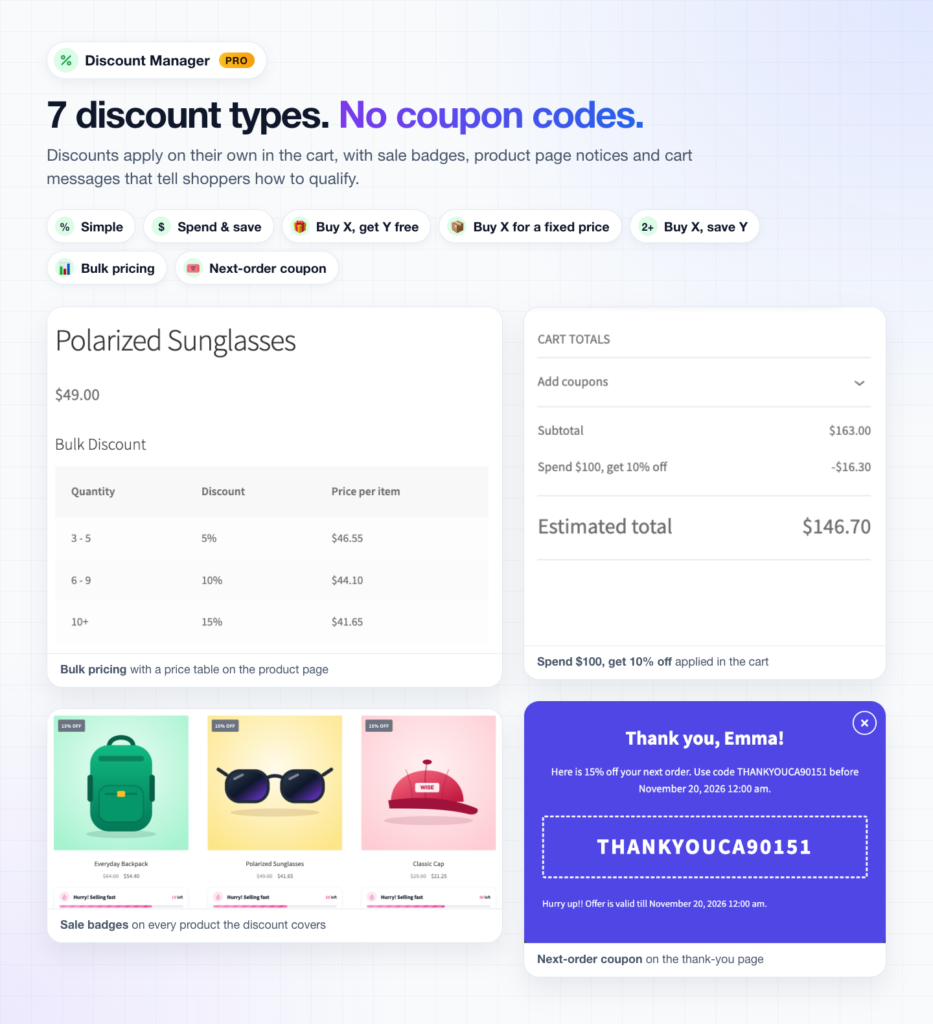
Screenshots from a Storefront test store with wiseCampaign 2.2 turned on.
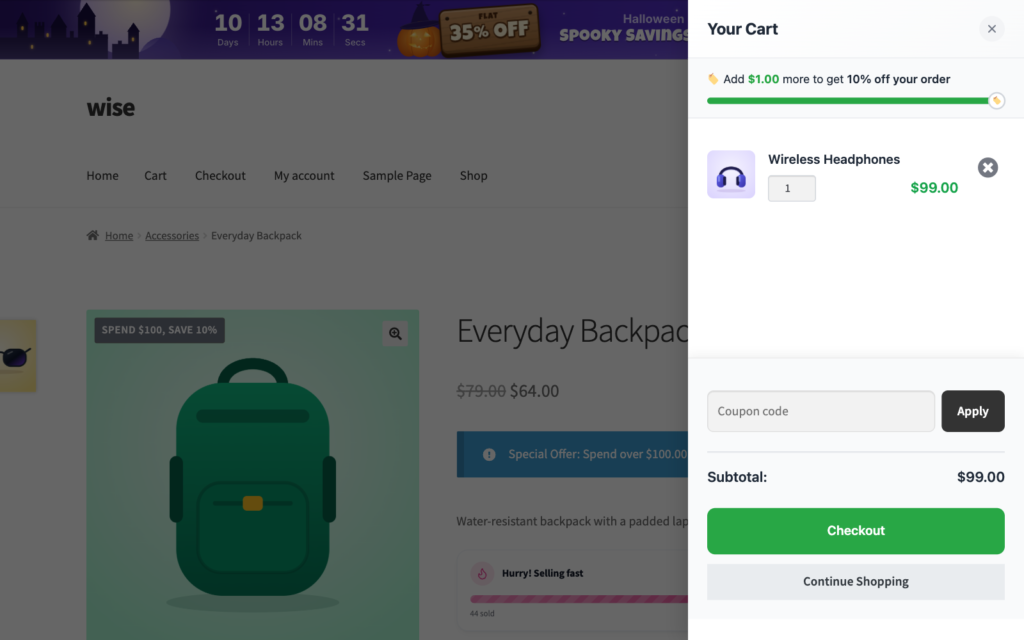
Replace the cart page with a cart that slides out on any page. Shoppers see their items, their next reward and what they save, without leaving the page.
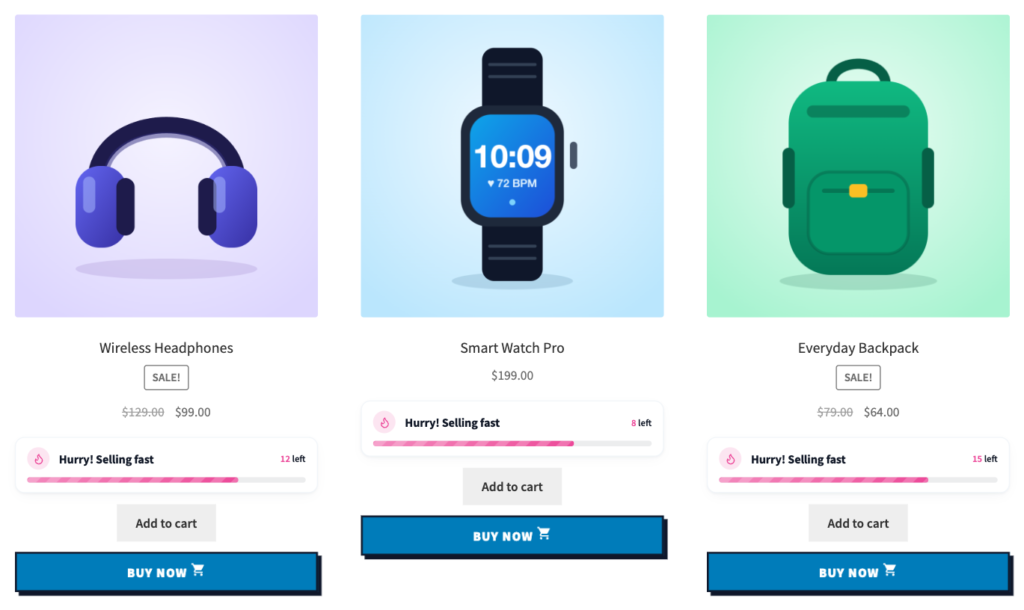
StockBar shows how many items are left and how many have sold, on shop and product pages. Direct Checkout adds a Buy Now button that puts the product in the cart and goes straight to checkout.
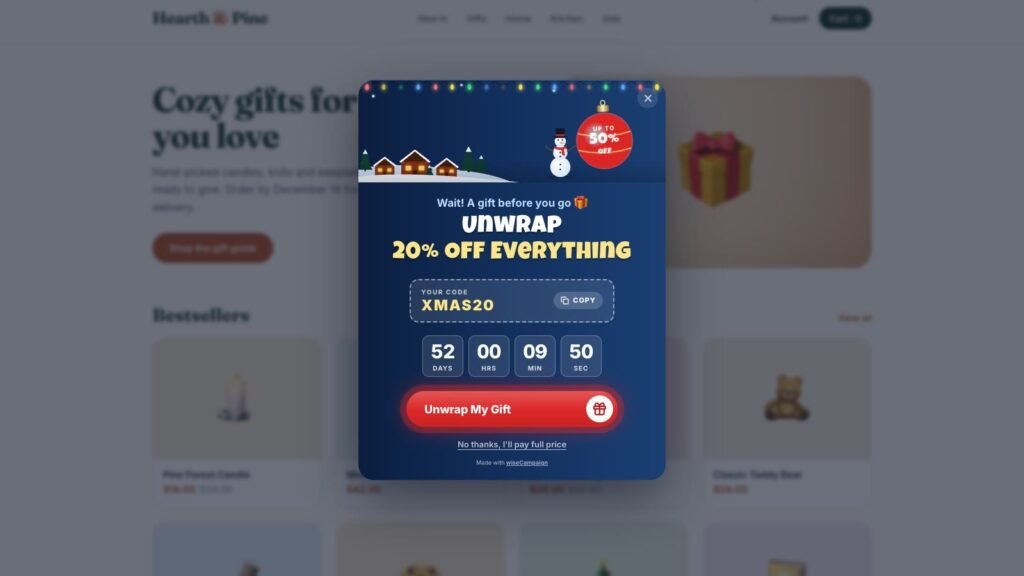
Run flash sales and seasonal campaigns with a sticky bar at the top or bottom of your store. When a visitor is about to leave, a matching popup offers one more reason to buy.
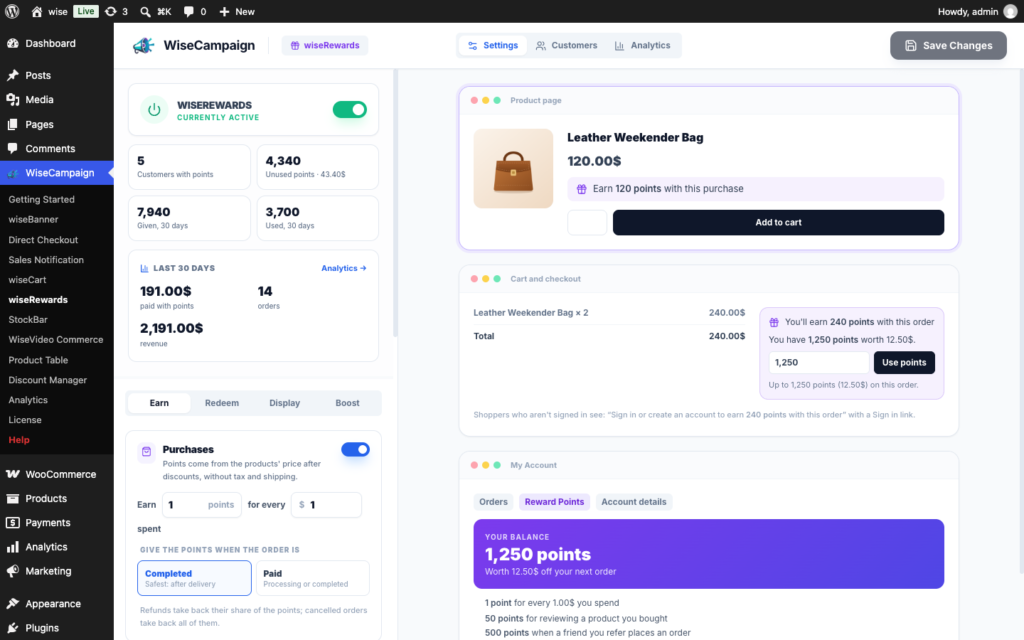
Customers earn points for purchases, signups and reviews, and spend them on their next order. The settings show a live preview of your product page, cart and My Account.
Nine modules, plus the exit-intent popup that comes with wiseBanner. Turn on the ones you need. The rest stay off and don’t load on your store.
The Analytics dashboard (wiseCampaign > Analytics) shows how each module helps your sales, so you keep the offers that work.
A typical plugin stack
Five settings screens, five update cycles, designs that don’t match, and no single view of what raised your AOV.
wiseCampaign
Start with the free version and upgrade when you want the Discount Manager.
Every review wiseCampaign has on WordPress.org is five stars. Here are three of them, word for word.
Great Plugin for Boosting WooCommerce Sales
wiseCampaign is an excellent plugin for creating flash sales, countdown timers, and attractive discount offers. The features are useful for increasing customer engagement and encouraging more purchases. Highly recommended for any WooCommerce store owner!
Great for Countdown timer and Sales notifications.
wiseCampaign is a useful WooCommerce plugin for running flash sales and promotional campaigns. The countdown timer and sales notification features are particularly impressive, helping create urgency and boost customer engagement. Easy to use and a great addition to any WooCommerce store!
Must-Have Plugin!
wiseCampaign makes creating banners and managing campaigns so easy! Great features, simple setup, and excellent targeting options.
No code and no theme edits. Everything is set from the WordPress dashboard with a live preview.
Install the free plugin from Plugins > Add New, or upload wiseCampaign Pro after checkout. Your license key arrives by email and in your Wisemattic dashboard.
On the Getting Started page, switch on wiseCart, StockBar or the Discount Manager. Modules you leave off don’t load on your store.
Add a bulk pricing or spend & save rule, show the reward bar in wiseCart, then compare average order value in Analytics.
Straight answers about wiseCampaign, pricing and average order value.
wiseCampaign is a WooCommerce marketing plugin for WordPress, made by Wisemattic. It combines automatic discount rules, a slide-out cart with a reward progress bar, a points and rewards program, countdown sale bars, exit-intent popups, stock scarcity bars, one-click Buy Now buttons, sales notifications, product tables and shoppable video in one plugin, so a store can raise its average order value and conversion rate without code.
It gives shoppers a clear reason to add more to the cart. The Discount Manager adds bulk pricing tiers, BOGO deals, bundle prices and spend-based discounts that apply automatically. wiseCart shows a progress bar toward free shipping or the next reward. Next-order coupons bring buyers back, and Analytics compares the average order value of wiseCampaign orders with your other orders.
Yes. The free version on WordPress.org includes wiseBanner with the exit-intent popup (Basic templates), StockBar, Direct Checkout, Sales Notifications, wiseCart and wiseRewards points and rewards. wiseCampaign Pro adds the Discount Manager, Product Table, WiseVideo Commerce, wiseRewards referrals, tiers and campaigns, premium seasonal templates, more design options, and order and revenue analytics.
wiseCampaign Pro costs $59 per year for 1 site (Personal), $149 per year for 5 sites (Small Business) and $299 per year for up to 100 sites (Agency Plus). Every plan includes all Pro features; plans differ in the number of sites and the level of support. Prices exclude VAT, and every plan has a 14-day money-back guarantee. See the pricing page for current offers.
No. Discount Manager rules apply on their own in the cart. Sale badges, product page notices and cart messages tell shoppers how to qualify. You can still use coupon codes in wiseBanner, the exit-intent popup and next-order coupons when you want them.
wiseCampaign loads only the modules you turn on. A module that is off leaves the menu and does not load on your store. The modules use scoped CSS, and Analytics stores only daily totals in your own database.
wiseCampaign uses standard WooCommerce hooks and works with popular themes such as Astra, OceanWP, GeneratePress and Storefront, and with block themes. It needs WordPress 5.8 or later, WooCommerce and PHP 7.4 or later.
In most stores, yes. wiseCampaign covers a countdown bar, an exit-intent popup, stock scarcity bars, sales notifications, a Buy Now button, a side cart and automatic discount rules. Turn on the matching module, check it on a staging copy, then switch off the plugin it replaces.
wiseBanner analytics are stored only in your own WordPress database as daily totals. No IP addresses, personal data or per-visitor records are stored, and nothing is sent to third-party services. A first-party cookie (wise_banner_ref, 7 days) links a banner click to the resulting order and is removed once the order is attributed.
If wiseCampaign Pro doesn’t meet your needs, ask for a refund within 14 days of your purchase and we return 100% of your money. Email support@wisemattic.com or open a ticket on the support page.